
Nov 26, 2025
Updated
Written by Gregory Shein, CEO & Founder
Design Rate Card Template and Examples
Download a free design rate card for your agency or freelance business. Use the Excel workbook and sample PDF to list services, prices and scope limits.
Get the free design rate card template: spreadsheet + PDF. No email or signup required.
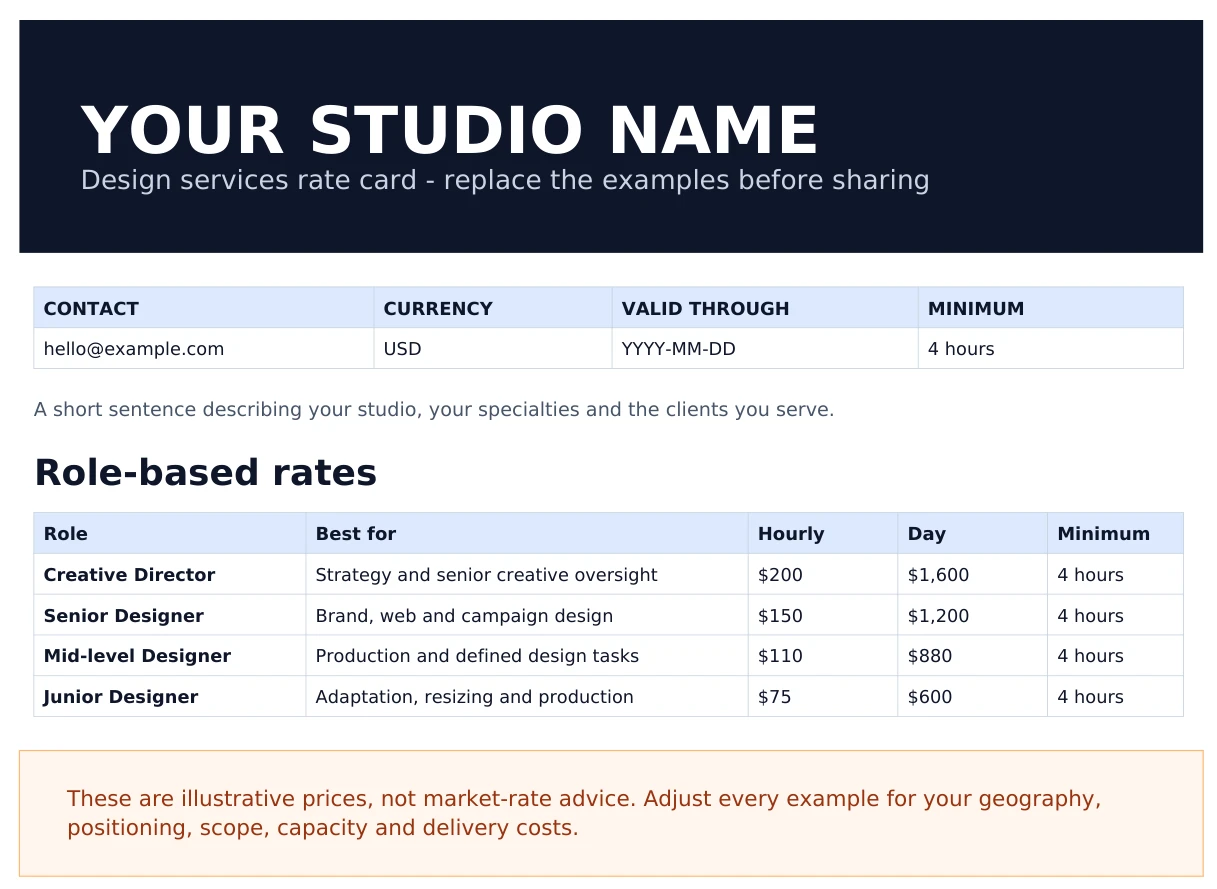
Preview of page 1 of the actual three-page PDF. All prices are illustrative USD examples to replace with your own rates.
What is a design rate card?
A design rate card gives clients a reference for what you offer and how you charge. It can combine hourly rates, fixed project ranges and monthly retainers. A useful card also states what each price includes: deliverables, revision rounds, turnaround, minimum engagement and additional costs.
A rate card helps you qualify a request. The project proposal then confirms the specific scope, price, timeline and payment schedule.
What's in the free template?
The download includes an editable Excel workbook that you can import into Google Sheets, plus a three-page sample PDF. The workbook has five sheets:
| Sheet | What to do with it |
|---|---|
| Start Here | Follow the setup and sharing instructions. |
| Client Rate Card | Replace studio details, services and public pricing examples. |
| Rate Calculator | Set hourly rates, hours per day and optional discounts. Formulas calculate day and retainer rates. |
| Internal Pricing | Check estimated delivery costs and margin privately. |
| Terms | Adapt the payment, revision, scope-change and validity language. |
Customize the workbook first. Export only Client Rate Card and Terms when sharing a PDF with a prospect. Keep Internal Pricing and Rate Calculator private. The supplied PDF is a static sample; it does not update when you edit the workbook.
Preview and download both files.
Design rate card examples
The following examples match the downloadable template. They illustrate how to structure a card; they are not market benchmarks or recommended prices.
Hourly and day rates
Use hourly pricing when the amount of work is uncertain or the client buys ongoing support. State the role, billing unit and minimum engagement.
| Role | Hourly rate | Day rate |
|---|---|---|
| Creative Director | $200 | $1,600 |
| Senior Designer | $150 | $1,200 |
| Mid-level Designer | $110 | $880 |
| Junior Designer | $75 | $600 |
These day rates assume eight hours and no day discount. The template's example minimum engagement is four hours. Replace both assumptions if you sell work differently.
Fixed project prices
For defined deliverables, pair a price or range with a scope summary. Make the final quote specific enough that both sides can identify additional work.
| Service | Example range | Included scope |
|---|---|---|
| Brand identity | $8,000–$15,000 | Logo suite, core visual system and guidelines; two revision rounds. |
| Landing page design | $3,500–$6,000 | Desktop and mobile designs for one page; two revision rounds. Development excluded. |
| Pitch deck | $2,500–$5,000 | Narrative structure and up to 15 designed slides; two revision rounds. Copywriting excluded. |
A “website” can mean design files, implementation or both. Name that boundary on the card, then confirm the number of pages, content responsibilities and handoff files in your scope of work.
Monthly retainer prices
A retainer needs an agreed service level as well as a monthly fee. Define included hours or deliverables, response expectations, overages and what happens to unused capacity.
| Plan | Included hours per month | Example monthly fee |
|---|---|---|
| Starter | 20 | $2,790 |
| Growth | 40 | $5,280 |
| Partner | 60 | $7,650 |
These are the template's sample fees. For example, the Starter plan uses 20 hours × $150 × (1 − 7%) = $2,790. Discounts are optional. Avoid promising a discount, rollover or turnaround that your delivery capacity cannot support.
See the design retainer management walkthrough for an example of keeping the agreement, recorded work and invoice separate.
How to calculate your own design rates
Start with the cost of delivering the work and the hours you can realistically bill.
1. Estimate your cost per billable hour
In this illustrative annual budget, compensation costs $93,750 and allocated overhead costs $24,000. At 1,560 billable hours:
($93,750 + $24,000) ÷ 1,560 = $75.48 per billable hour.
Include the costs relevant to your business. Leave capacity for sales, administration, leave and other nonbillable work rather than assuming every working hour can be sold. Use the billable utilization calculator to explore that assumption.
2. Choose a margin assumption
If you choose a 35% margin on the costs included above:
$75.48 ÷ (1 − 0.35) = $116.12 per hour.
That is a planning example, not a universal target. Adding 35% to cost produces a different result because markup and margin use different denominators. The billable rate calculator lets you compare your own assumptions.
3. Build a project estimate
For a logo project, you might estimate:
| Work | Estimated hours |
|---|---|
| Discovery and research | 2 |
| Initial concepts | 8 |
| Refinement | 4 |
| Two revision rounds | 4 |
| Final files and handoff | 2 |
| Total | 20 |
At an illustrative $150 hourly rate, that is $3,000. A chosen 20% contingency adds $600, producing a $3,600 quote. Check the estimate against the actual scope and delivery costs with the project profitability calculator.
After delivery, compare estimated and recorded hours. That gives you evidence for adjusting the next quote.
What to include before sending a rate card
- Currency and validity: identify the currency and how long the prices apply.
- Scope: state the deliverables, revision rounds and exclusions.
- Timing: distinguish a normal delivery window from a guaranteed deadline.
- Payment schedule: agree the deposit, milestones and final payment.
- Additional work: explain how you estimate and approve a new direction or extra deliverable.
- Third-party costs: identify anything quoted separately, such as fonts, stock assets or development.
The change request template can help document extra scope once a project has started.
Send the rate card with a short explanation of which service fits the request. If the budget is lower than the planned work allows, discuss a smaller scope, a different schedule or a phased project.
From an agreed hourly rate to a Corcava invoice
Once the client agrees to hourly work, carry that rate into the project and record the time delivered. The following screenshots show real Corcava screens populated with fictional demo records. This separate demo uses $75/hour, rather than the role prices in the template above.
Set the project bill rate
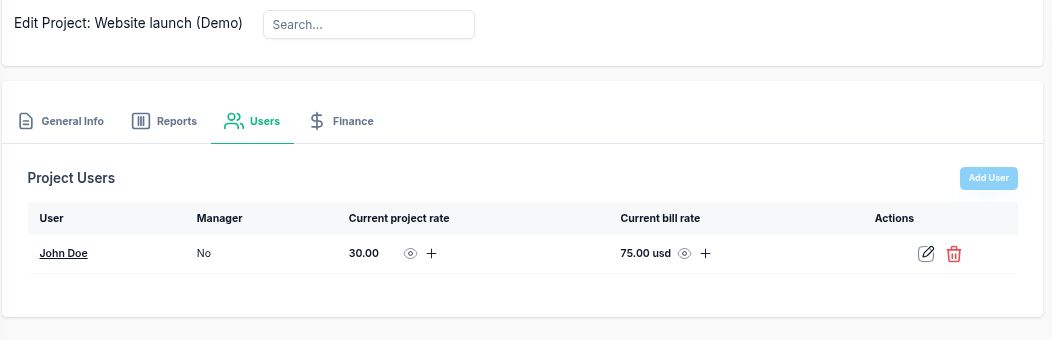
Website launch (Demo) uses a $30/hour internal cost rate and a $75/hour client bill rate. The invoice calculation uses the bill rate.
Review the work and save a draft
The demo records 3 hours 30 minutes for homepage layout and 2 hours 15 minutes for responsive implementation. Together, 5.75 hours × $75 = $431.25.
In the invoice, choose the client, project and date range, preview the generated line items, then review and save the draft.
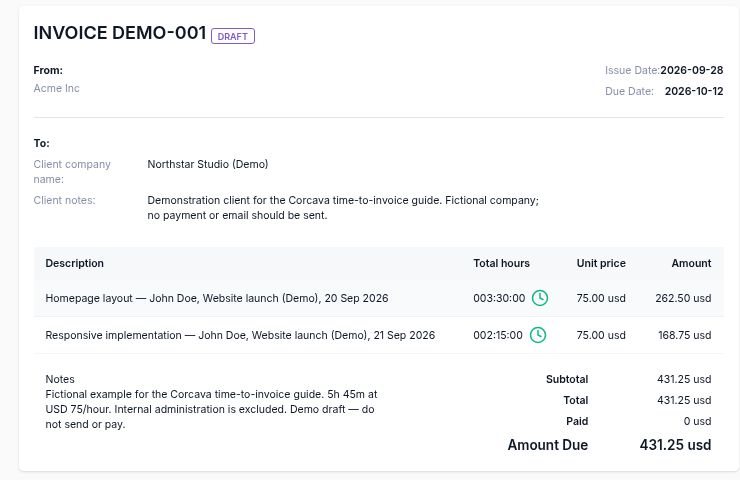
Saved draft DEMO-001 contains $262.50 + $168.75 = $431.25. It has not been sent or paid.
See the complete time-to-invoice walkthrough, including the line-item preview and how the demo excludes internal administration time.
For fixed project fees, invoice the agreed deliverables or milestones and use tracked time to review delivery cost. A time-generated invoice fits hourly billing; it does not establish a fixed fee or retainer agreement for you.
Frequently asked questions
Can I use the rate card in Excel or Google Sheets?
Yes. Download the .xlsx workbook and open it in Excel or import it into Google Sheets. Replace the example inputs, review the calculated prices and export the client-facing sheets.
Should designers charge hourly or per project?
Hourly pricing suits work with uncertain volume. Fixed pricing suits a defined deliverable. Retainers suit recurring work with an agreed allowance or service level. Choose the model that fits the scope and how the client will approve additional work.
How much should a design agency charge?
There is no single rate that fits every agency. Build a price from your delivery costs, billable capacity, scope and margin assumptions, then consider your positioning and what the client needs. The sample prices in this template are examples, not market-rate advice.
What's the difference between a rate card and a proposal?
A rate card lists reference prices across services. A proposal confirms a particular project's scope, deliverables, timeline and fee.
Build your rate card, then use it on a project
Download the spreadsheet and PDF, replace the examples and agree the scope with your client. When you're ready to connect the work to billing, follow the time-to-invoice example or start a Corcava trial.
Related guides: billable vs nonbillable design time, project finances, and agency management.