

Aug 9, 2026
Updated
Written by Gregory Shein, CEO & Founder
Retainer vs Fixed Price vs Hourly: Running All Three Billing Models
Use one delivery record, with a different invoice review for each commercial agreement.
An agency can work with hourly, fixed-price and retainer clients at the same time. The useful common process is to record the client, scope, delivery effort and cost consistently. The billing decision still depends on the agreement. A time report alone cannot decide what a client owes.
Choose the model around the work
| Model | Useful when | Invoice basis | Main review question |
|---|---|---|---|
| Hourly | Work evolves and the client agrees to pay for approved time | Approved hours × agreed rate, plus agreed extras | Are the entries accurate and chargeable? |
| Fixed price | A defined outcome has clear acceptance criteria | Agreed project fee or milestone | Has the milestone or billing condition been met? |
| Retainer | A client needs repeated services or reserved availability | Agreed fee for a stated period | What is included, what was used and what needs separate approval? |
These are commercial choices, not promises that selecting a project field configures all related billing behavior. Write down scope, currency, payment timing, revision limits and approval responsibilities before delivery.
Keep one reliable delivery record
Create or select the client and project, describe the scope, and assign the team. Record the work even where hours do not set the invoice amount. Effort and cost help you understand whether a fixed fee is sustainable and whether a retainer's commitments fit its allowance.
Use cost rates for internal labor review and bill rates where the agreement actually charges by the hour. Check rate effective dates and the reporting period. A recorded hour, a calculated billed amount, an invoice total and a payment are different records.
Hourly: review entries before making the invoice
For hourly work, check the date, task, duration and agreed bill rate. Remove duplicates and resolve entries that are outside scope before generating line items. Review the generated invoice and its period before sending.
The project profitability walkthrough uses a fictional eight-hour project at a $125 hourly bill rate: $1,000 in time-based invoice lines. It also explains why labor cost, project expenses and payments must be checked separately. Do not reuse that hourly amount as the fee for the separate retainer below.
Fixed price: invoice the agreed outcome
A fixed-price agreement charges for a defined scope or milestone. Track actual delivery effort to review cost, but enter or review the invoice against the agreed fee. Additional work needs its own approval; more time recorded does not automatically authorize a larger invoice.
For example, a $2,000 fixed project with 20 recorded hours at a $50 cost rate has $1,000 of modeled contribution before other costs. This is an illustrative manual calculation, not a screenshot of a saved project or a built-in margin result.
Do not assume a manually entered fixed-fee line consumes related time entries. Reconcile those records before generating another invoice from time.
Retainer: review each period's agreement and delivery
The saved Northstar design retainer example uses a $1,500 monthly fee and a 12-hour allowance. It records eight September hours at a $50 cost rate and saves a separate $1,500 invoice as Draft.
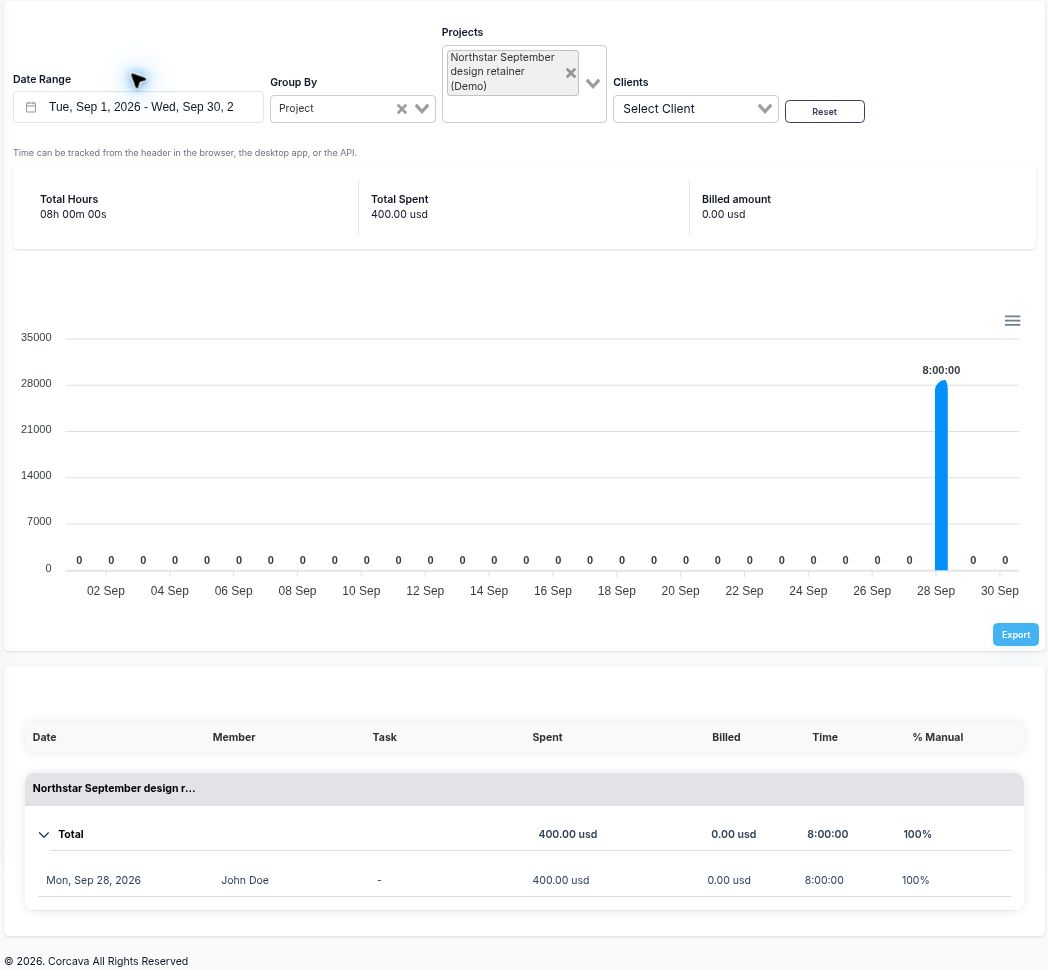
The retainer's hourly bill rate is blank. The report shows $0 Billed amount; its separate monthly invoice is $1,500.
The manual allowance review is 12 − 8 = four hours unused, with 66.7% of the allowance used. That balance is not a forecast of remaining delivery capacity. Estimate unfinished commitments before agreeing to additional requests.
The fee-based contribution calculation is $1,500 − $400 = $1,100, or 73.3%, before overhead, tax and other unrecorded costs. The draft invoice has $0 paid, so the calculation is not cash profit.
A recurring invoice setting is not the same as a working fixed-fee retainer automation. The current generation path builds time/expense line items and does not repeat the configured fixed fee. It can also queue email when a client email exists. Use the manual fee workflow for this example and review the recurring-invoice documentation before using generation settings.
Use a shared month-end review
- Check the delivery period and complete missing time records.
- Compare completed work and remaining commitments with the agreement.
- Review recorded cost using a consistent basis.
- Choose the invoice basis: approved hours, agreed milestone or period fee.
- Reconcile included work against existing invoices to avoid duplicate charges.
- Review and send the invoice through your normal process; check payment status separately.
Keep a retainer worksheet for monthly allowance and renewal notes. It is a manual PDF worksheet, so update it when the underlying records change. For the underlying terminology, see What Is a Retainer Fee?.