
Delivery & Reporting
Weekly Status Report Template
Updated
Tell the client what changed this week, what happens next and which decision you need. Copy the blank weekly update or adapt the fictional Northstar Website Launch example, including a pending request that has not changed the agreed scope.
Download the printable blank update
Use the PDF to prepare your next weekly review, or copy the plain text into an email or shared document.
Download PDFFree to use. Prepare, review and share the update manually.
Blank weekly status report to copy
Lead with the change since the last update. Use a checked snapshot for counts and a named owner and date for every action.
WEEKLY STATUS REPORT
Project / client: [name]
Period: [start → end] | As of: [date]
Prepared by: [name]

SUMMARY
[What changed, what it means, and the next decision]

COMPLETED SINCE THE LAST UPDATE
[Deliverable / task] — [result and evidence]

CURRENT BASELINE
Approved launch / next milestone: [date]
Linked tasks done: [previous done / total] → [current done / total]
Scope added or removed: [none, or approved change reference]
Schedule assessment: [Green / Amber / Red] — [manual reason]
Verified hours / costs, if relevant: [amount and source, or not included]

NEXT ACTIONS
[Action] | Owner: [name] | Due: [date]

BLOCKERS AND DECISIONS
[Question / risk] | Needed from: [name] | By: [date]
Effect if unresolved: [impact]

PENDING CHANGE (if any)
[Request ID / description]
Proposed cost: [hours x rate, or fixed amount]
Proposed launch / milestone: [current date → proposed date]
Status: [pending written approval / approved / declined]
Baseline changed: [yes / no]

NEXT UPDATE
[Date and sender]
Completed example: week ending September 28, 2026
Fictional Northstar Website Launch update, prepared by John Doe for September 22–28. The underlying task transition comes from the website-launch demo; the reporting period, ownership and change proposal illustrate how to write the update.
Summary
The mobile-layout check is complete. The roadmap now shows 4/6 linked tasks done (67%), up from 3/6 (50%). The approved launch target remains October 9. We need a written decision on the proposed newsletter signup form by October 2.
Completed this week
“Check mobile layouts” moved to Done. Build progress increased from 1/3 (33%) to 2/3 (67%). Scope remains 2/2 and Launch remains 0/1. The denominator is still six tasks; no new work has entered the baseline.
Schedule assessment: Amber
John Doe has manually assigned Amber because the enquiry-form test and launch approval remain before October 9. This is a reporting judgment, not a generated roadmap status. The 67% count does not measure hours or forecast the delivery date; verified hours and costs are not included in this example.
Next actions
- Test enquiry form — John Doe, due October 2.
- Approve launch — John Doe, due October 9.
- Follow up on the written CR-001 decision — John Doe, October 2.
Decision requested: CR-001
Add newsletter signup form: proposed effort 4 hours at $125/hour, totaling $500. The proposed launch would move from October 9 to October 12, 2026. Please approve or decline in writing by October 2.
Pending written approval: the approved baseline has not changed, and the extra task is not linked to the roadmap. John Doe will continue tracking the existing October 9 plan until the decision is recorded and any approved changes are applied. The CR-001 change request example sets out the options and approval record.
Next update
John Doe will send a decision checkpoint on October 2 and the next weekly update on October 5. If the test uncovers an issue, report its effect and proposed next action as soon as it is known.
Explain what changed on the roadmap this week
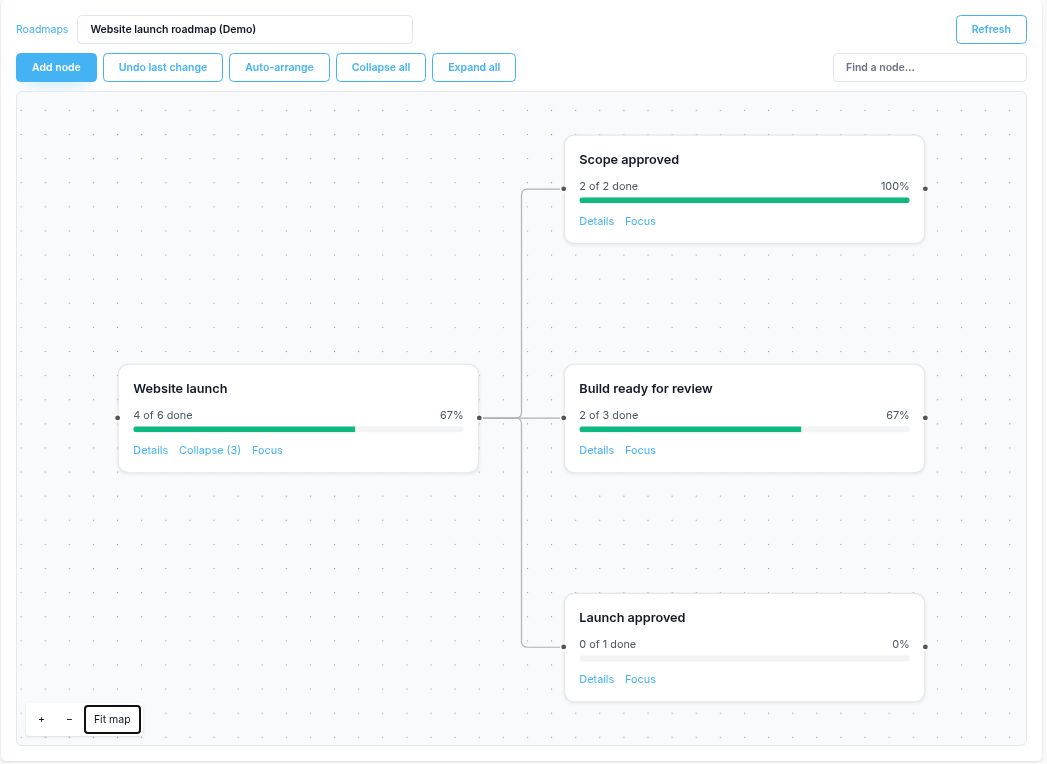
The website-launch roadmap example shows the task change behind these numbers. Compare snapshots before writing the weekly note. If the linked task set changes, explain the added or removed work as well as the percentage.
Prepare a useful weekly update
- Check completed work against the previous report and confirm the current counts.
- Write the impact in plain language. Mark estimates, judgments and pending changes explicitly.
- Give each next action an owner and a date. Ask for decisions before they affect delivery.
- Review the report for its recipients, share it manually and keep a dated copy for the next comparison.
Use the project status report template when the question is overall health, scope and the approved plan. The scope of work and change order template hold the agreements behind that plan.
See how these updates fit into the agency delivery and profitability workflow.
Frequently asked questions
What should a weekly status report include?
Name the reporting period, describe what changed, show the current baseline, list the next actions with owners and dates, and ask for specific decisions. Include hours or costs only when you have checked the source records.
How is a weekly report different from a project status report?
The weekly report explains the changes since the previous update and the next actions. A project status report assesses the whole project against its approved scope, schedule and budget. Small projects can combine the two.
Why did completion rise from 50% to 67% in the example?
Check mobile layouts moved to Done, increasing the completed count from three to four out of the same six linked tasks. The roadmap rounds four divided by six to 67%. No task was added for the pending newsletter request.
Can I send this report automatically from Corcava?
This template describes a manual workflow: check the board and roadmap, copy the text or use the printable blank PDF, write your update, review it and share it yourself. It does not demonstrate automatic report generation or client portal access.