
Invoicing connected to the client work behind it
Updated
Create and track client invoices without disconnecting them from projects, tracked time, expenses, or the people doing the work — built for agencies, consultancies, and billable service teams.
No credit card required · Service-business invoicing — not double-entry accounting
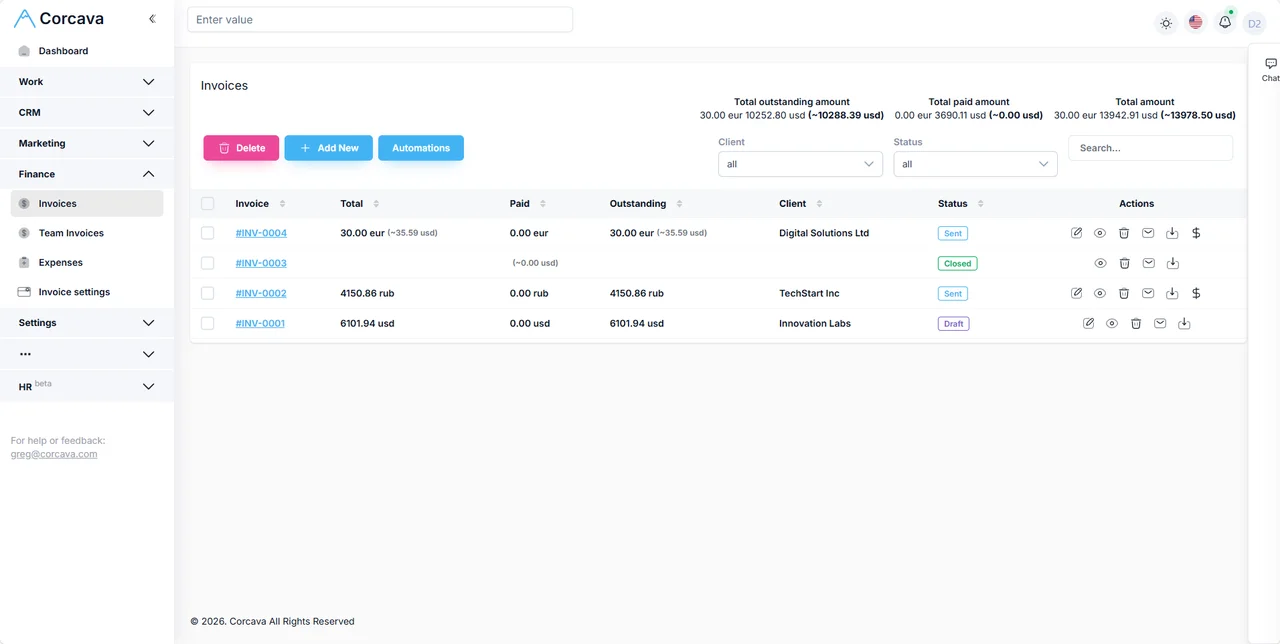
Billing should remember the work
Standalone invoice tools create documents fast. They do not know which project the hours came from, which expenses are rebillable, or whether the client already paid half the retainer. Your team reconstructs that context every billing cycle.
Corcava invoices live on the same client and project records as time tracking, expenses, and reporting. After you send an invoice, it appears in Project Finances alongside spent-vs-billed context — operational billing, not a general ledger.
Invoice workflow from project context
You choose when to invoice. Corcava keeps the line items connected to the work that produced them.
- Select client and project — invoice inherits currency and project association from the client record.
- Add line items — pull selected tracked time, add manual or fixed-fee lines, attach billable expenses where supported.
- Configure details — issue date, due date, tax rates, discounts, notes, and invoice numbering.
- Preview — review the client-facing layout with your team branding.
- Send or share — email the invoice to the client and/or make it available in the client portal.
- Track the balance — check recorded payments and the amount due. A partial payment leaves the invoice Sent; recording the full balance closes it.
- Review finances — see the invoice in Project Finances and uninvoiced reports for the same project.
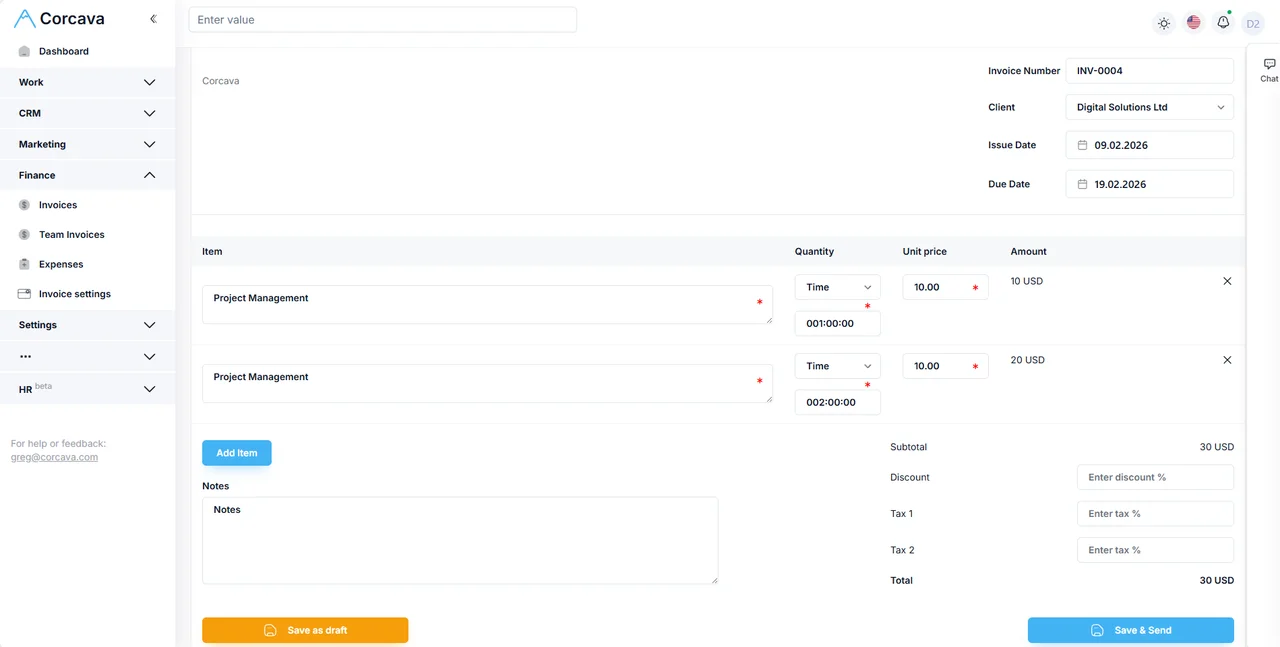
Generated lines link to selected time intervals. Saving the invoice, including as a draft, marks that time as invoiced for subsequent generation.
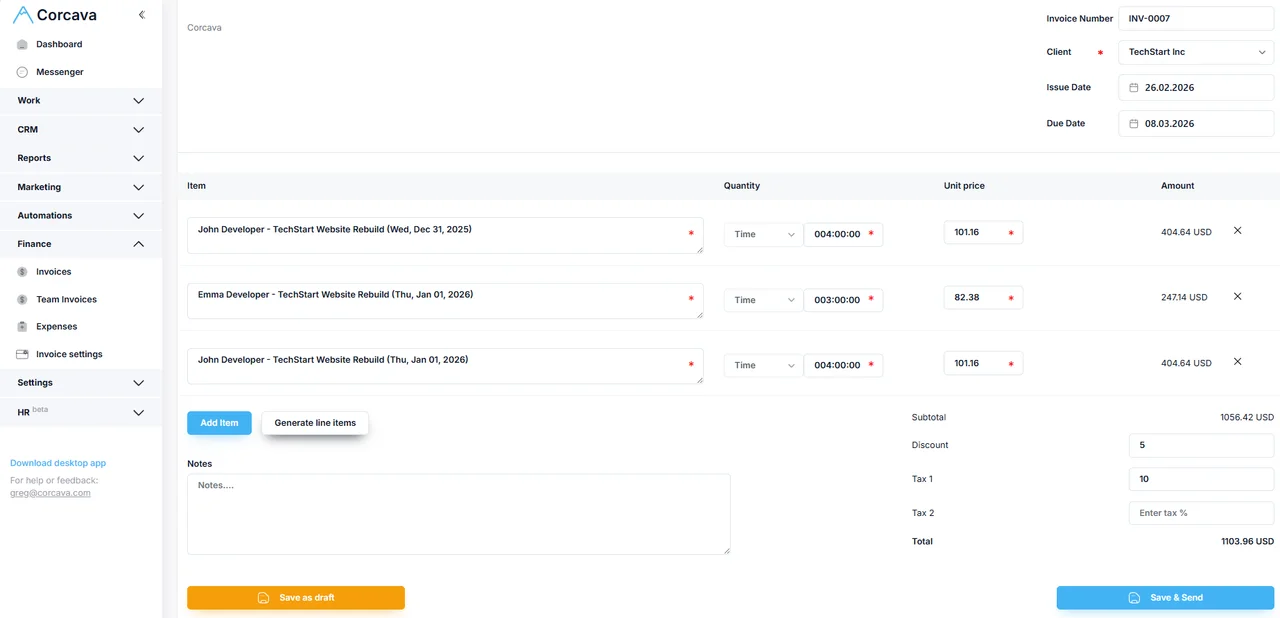
Choose the client, project, people and dates, then review hours and amounts before adding generated lines.
Invoice tracking for service teams
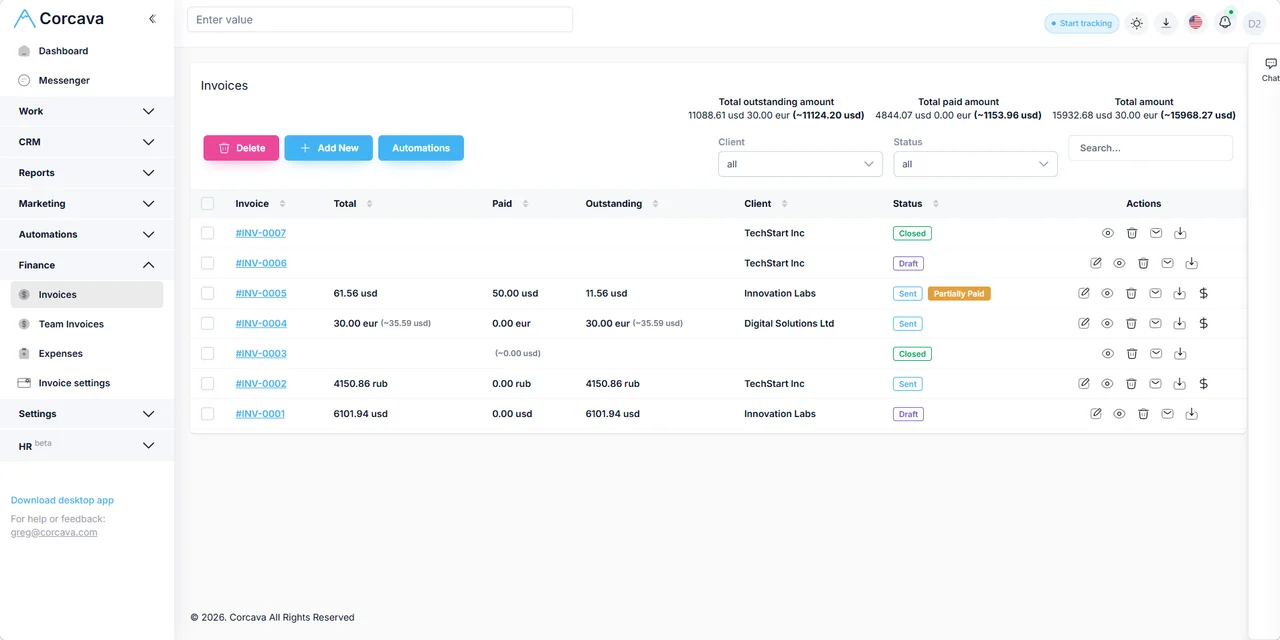
Review each invoice's total, paid amount, outstanding balance, client, and status. Use the client and status filters to narrow the list, then check the invoice detail before following up.
- Open includes Draft and Sent. Exclude drafts from your issued collection balance.
- Overdue needs a due-date check. The list has no overdue filter; compare the invoice's due date with its unpaid issued balance.
- Partial payments reduce the remainder. Record the payment date, amount, and notes after verifying receipt.
- Closed needs payment evidence. It can be set manually, so check the paid amount and payment history.
Recording a manual payment updates Corcava's records. It does not charge the client or transfer money.
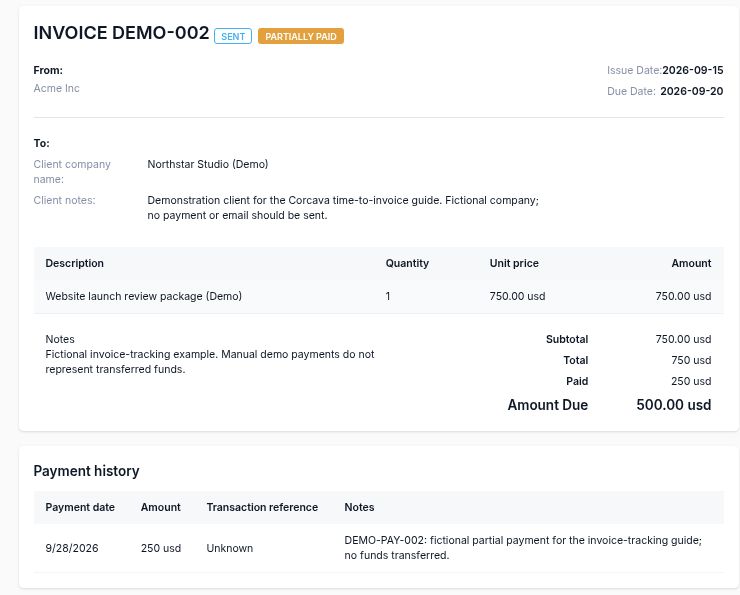
Follow the invoice tracking walkthrough for every step, or download the invoice tracker spreadsheet for a manual collection list.
Choose the invoice basis for the agreement
Hourly / time-based
Select tracked time intervals at project bill rates. Line items reference the original time entries. Best for T&M and consulting engagements.
Fixed-fee / milestone
Add manual line items for fixed deliverables or milestone payments. Compare delivery cost in reports against the agreed fee.
Monthly fee / retainer
Enter the agreed period fee as a manual line. Review included hours separately and reconcile them before later time-based billing. Scheduled generation does not repeat the configured fixed retainer fee.
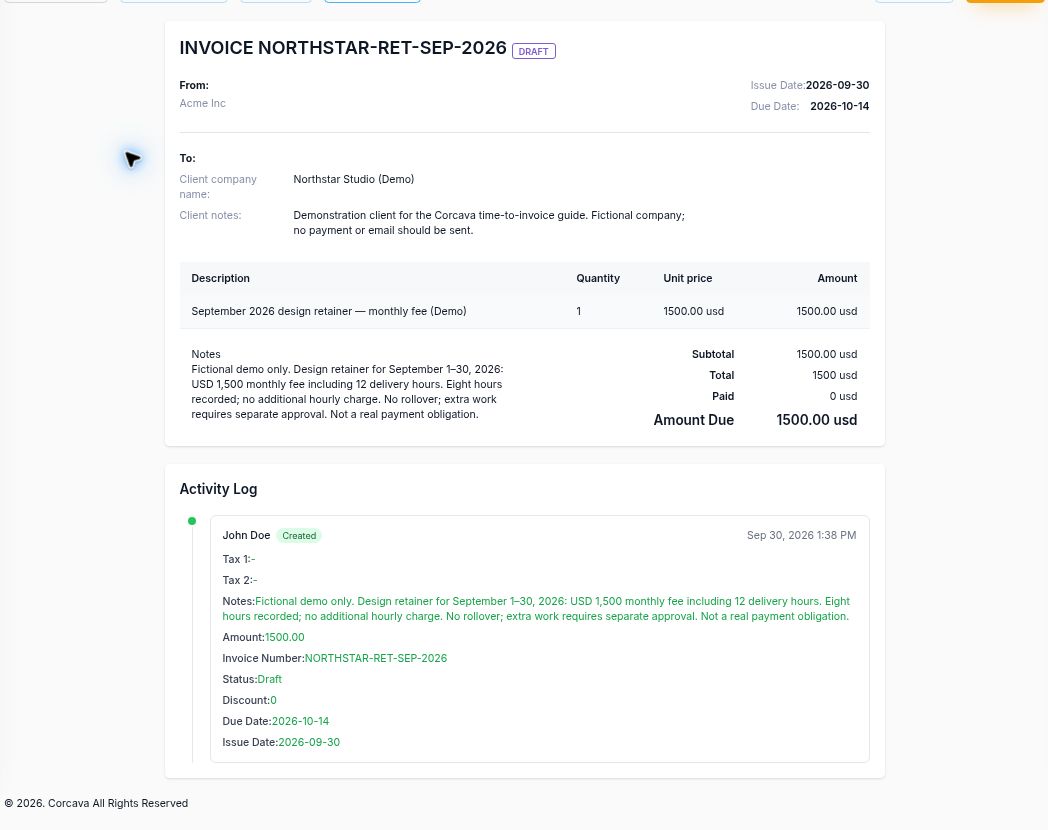
For time-based recurring generation, review the current schedule and sending behavior. The generator can queue email even when the invoice is Draft; its sending preferences do not prevent that on this path.
Multi-currency invoicing
Invoice each client in their preferred currency. Team base currency is used for consolidated reporting. Payment recording supports multi-currency with conversion to base currency for operational views.
For official accounting and tax reporting, use your accounting software with figures exported or entered according to your finance team’s rules.
Branding and client experience
Invoices include your team and client details, professional layout, and line-item breakdown. Clients access invoices through the portal, pay online via supported providers, and retain payment history in the same place.
- ✓Stripe for card payments
- ✓Crypto payment support where configured
- ✓Client portal self-service invoice access
Portal white-label controls (logo, domain) are documented on the client portal page. Invoice branding follows your team settings.
After you send: financial visibility
Invoices are not isolated PDFs. They feed the operational financial picture on each project:
- →Project Finances ledger shows linked client invoice amounts, including unpaid drafts
- →Reports show spent vs billed and uninvoiced work on the same project
- →Expenses and team invoices appear as costs in the same project context
Corcava supports operational project finances and invoicing. Your general ledger, tax filings, and formal reconciliation stay in QuickBooks, Xero, or similar.
Follow up on the current balance
A USD 750 invoice with USD 250 already recorded needs a USD 500 reminder. Check payment history before re-sending, and stop reminders once the balance is reconciled.
The invoice screen offers a re-send action; it does not provide a native timed overdue-reminder sequence. Use the invoice email and payment reminder examples to prepare an initial email, partial-payment follow-up, or payment confirmation.
Three approaches to client billing
| Approach | Strength | Cost of fragmentation |
|---|---|---|
| Standalone invoice generator | Fast document creation | Little project, time, or expense context |
| Accounting suite | Formal books and reconciliation | Delivery teams may still reconstruct work context manually |
| Corcava invoicing | Invoice workflow connected to service operations | Does not replace the formal accounting system |
Payment & bank integrations
Collect client payments online and connect your business bank for invoice matching and contractor payouts.
Frequently asked questions
What is invoice tracking software?
Software that lets you create invoices and track their status, due dates, and payments over time — ideally connected to the projects and time entries that produced the billable work.
Can I create invoices from project time?
Yes. Select tracked time intervals to generate line items. Saving those lines links the time to the invoice, including a draft, and excludes it from subsequent generation. Review existing drafts before billing the same period again.
Can I send automatic overdue reminders?
The invoice screen supports re-sending an invoice but does not provide a native timed overdue-reminder sequence. Check the current balance and select the next follow-up date in your working process.
Can I invoice in multiple currencies?
Yes. Each client can have a preferred invoice currency. Consolidated reporting uses your team base currency for comparison.
Can clients view or pay invoices online?
Yes. Clients access invoices in the portal and can pay via Stripe or supported crypto processors where configured.
Does Corcava replace QuickBooks or other accounting software?
No. Corcava handles service-business invoicing and operational project finances. Tax, GAAP reporting, and your general ledger remain in accounting software.
How do invoices appear in Project Finances?
Client invoices appear as positive ledger entries on the project. Combined with team invoices and expenses, you see money in and out on the same project record.
Can I track unpaid or overdue invoices?
Yes. Review paid and outstanding amounts, then check the due date on the invoice detail. Open includes Draft and Sent invoices, so exclude drafts from the collection balance. Closed can be set manually; confirm payment using the paid amount and payment history.
Project Finances
See invoices in the per-project financial ledger.
Reporting
Uninvoiced work and spent-vs-billed before you bill.
CRM + invoicing
From deal to paid invoice on one client record.
Time Tracking
Source data for time-based invoice line items.
Client Portal
Clients view and pay invoices self-service.
Profitability calculator
Model margin before you send the quote.
Billable hours calculator
Convert time to decimal hours and billing increments.
Consulting software
Invoice from tracked time on consulting engagements.
Professional services automation
Full PSA workflow from lead to paid invoice.
Invoice from the work, not from a blank template
Connect projects, time, expenses, and payments on one client record.
Start free 14-day trial →No credit card required