
Project Finances: review project income and costs
Updated
Review the invoice and expense records connected to a project, then compare them with recorded hours and rates. Understand what Income, Expenses, Total, Spent and Billed each measure before making a profitability decision.
Read time reports and the ledger together
| Measure | What it uses | How to interpret it |
|---|---|---|
| Spent in time reports | Recorded time × applicable cost rate | A rate-based labor cost estimate; project expenses are separate |
| Billed in time reports | Recorded time × applicable bill rate | Time valued at your rates; check invoices separately |
| Income in Project Finances | Linked client invoice amounts | Can include Draft or unpaid invoices; it is not a collection total |
| Expenses in Project Finances | Linked team invoice amounts and project expenses | Recorded ledger costs; raw time cost is not included automatically |
| Total in Project Finances | Income − Expenses | The ledger balance on those inputs; check missing and overlapping costs |
Start with hours and the rates for that work
Record time against the intended project, with a task when needed. In reports, a project-specific cost rate takes precedence over the member's basic pay rate when applicable; the bill rate is separate. Rates effective at an interval's start determine its rate-based values.
For Northstar delivery review (Demo), the report shows 8 hours × $50 cost rate = $400 Spent and 8 hours × $125 bill rate = $1,000 Billed. The separate $100 direct expense does not increase Spent in this time report.
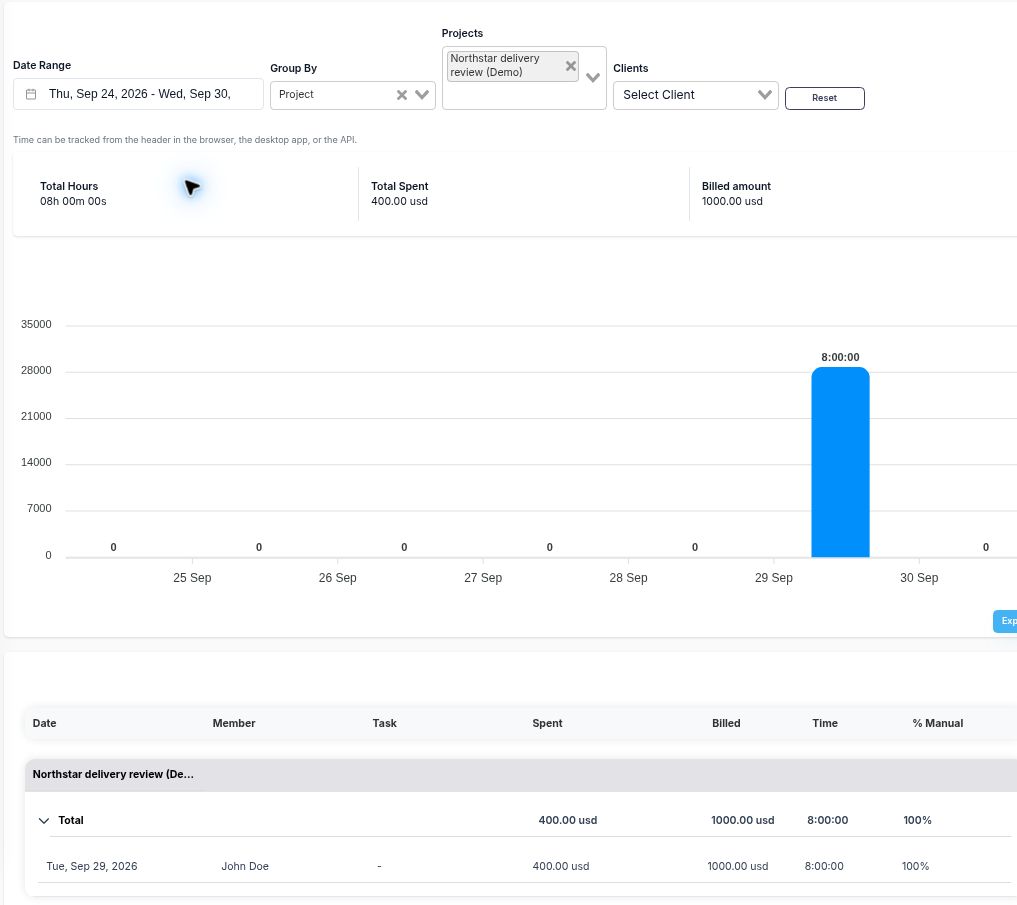
Review historical rate changes before comparing a report with a saved invoice. Editing a rate can change a live report without changing that invoice. See time tracking and reporting for the underlying records.
Check which records reach Project Finances
The ledger combines project expenses with client invoices linked through time entries or expenses, and team invoices linked through time entries. An invoice being associated with the same client is not enough to establish the project's complete financial picture.
- Invoice status: linked invoice amounts count without a payment-status filter. Review Draft, sent and payment states in invoicing before describing money as collected.
- One invoice across several projects: the full invoice amount can appear in each linked project's ledger. Use a single-project invoice for a direct comparison, or reconcile the allocation separately; do not sum those project totals as unique revenue.
- Fixed-fee estimate invoices: creating a project and invoice from the same accepted estimate does not automatically link that invoice to project time or expenses. Verify the resulting records before expecting it in this ledger.
- Currency: this example uses USD throughout. Invoice rows use a stored base-currency amount when available, with a raw-amount fallback; project expenses use their recorded amount. Check the currency basis before combining figures.
An uninvoiced time entry has no relevant invoice link. Saving a draft can establish that link, so an uninvoiced list is a billing-preparation view, not a list of unpaid invoices.
Reconcile the example before calculating a margin
The Northstar example uses a $1,000 client invoice and a $100 direct expense. There is no team invoice for the eight recorded hours. The client invoice has Sent status and $0 paid; the status was changed without sending an invoice email.
| Input | Amount |
|---|---|
| Client invoice: Income | $1,000 |
| Direct project expense: Expenses | $100 |
| Income minus Expenses: Total | $1,000 − $100 = $900 |
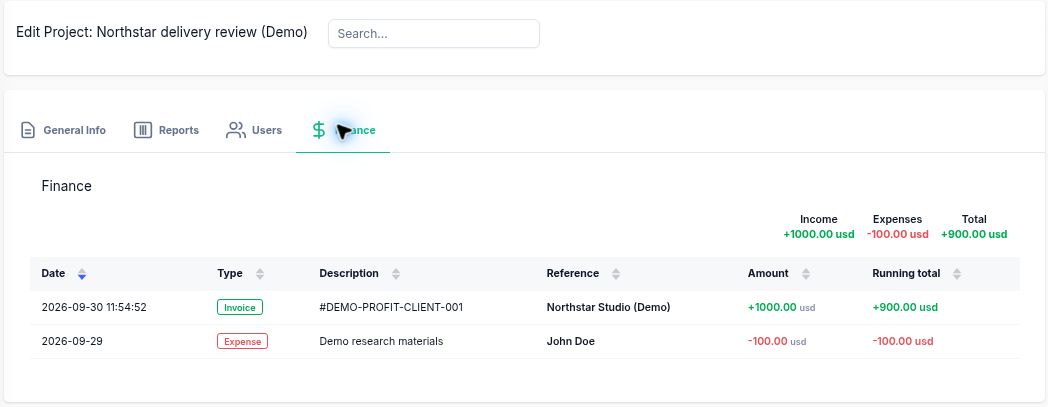
The $900 ledger Total excludes the $400 time-based labor cost. That cost is not represented by a linked team invoice, and raw Spent is not an automatic ledger deduction. Include it once when reviewing this project's contribution: $900 − $400 = $500.
On this stated cost basis, the manual contribution calculation is ($1,000 − $400 − $100) ÷ $1,000 = 50%, excluding overhead and tax. The $500 contribution and 50% margin are calculated outside the app's ledger. They do not establish cash collection or accounting revenue recognition.
When a team invoice covers the same labor in another project, count that cost once. Adding both its invoice amount and the corresponding Spent value would duplicate the labor cost. Check the records behind each amount before combining them.
Use the project profitability calculator to model a stated revenue and cost basis, and the worked project review to inspect the records behind it.
Use the review to choose the next action
Resolve missing rates, confirm invoice attribution, review direct expenses and decide whether scope or pricing needs attention. Retain the date range and cost assumptions used in the comparison so the next review is comparable. Review the intended account's financial access and the columns in any exported file before sharing; screen visibility and export contents can differ.
Keep official accounting and revenue recognition in your accounting process. For a broader operating review, see the agency profitability guide or consulting workflow.
Project Finances questions
What does Project Finances Total mean?
Total is the Income amount minus Expenses in the project ledger. It uses linked client invoices, linked team invoices and project expenses. Raw time cost, overhead and unlinked records are not automatically added to that calculation, so review the cost basis before interpreting profitability.
Does Income mean the client has paid?
No. Project Finances includes linked invoice amounts without filtering by payment status. A linked Draft invoice can contribute to Income. Check the invoice and its recorded payments separately to establish what has been collected.
How are Spent and Billed different from invoice totals?
Time reports calculate Spent from recorded duration and the applicable cost rate, and Billed from duration and the applicable bill rate. These are rate-based values. Saved invoice amounts and recorded payments are separate figures; later rate edits can change reports without changing an existing invoice.
Why might an invoice be missing from a project ledger?
Client invoices need linked time entries or expenses; team invoices need linked time entries. An invoice created from an accepted estimate does not acquire those links merely because the estimate also created a project. Check the actual attribution before using the ledger as the complete engagement total.
Should I add Spent to a team invoice covering the same work?
Count that labor once in your analysis. If the team invoice covers the same hours used to calculate Spent, adding both would duplicate the cost. Keep genuinely separate labor or expenses in the cost basis and label any differences.