
Reporting that stays connected to the work
Turn project, time, workload, and billing activity into operational reports — filtered by client, project, member, or task, with spent-vs-billed context when your permissions allow.
No credit card required · Operational reports from recorded work — not a general-purpose BI warehouse
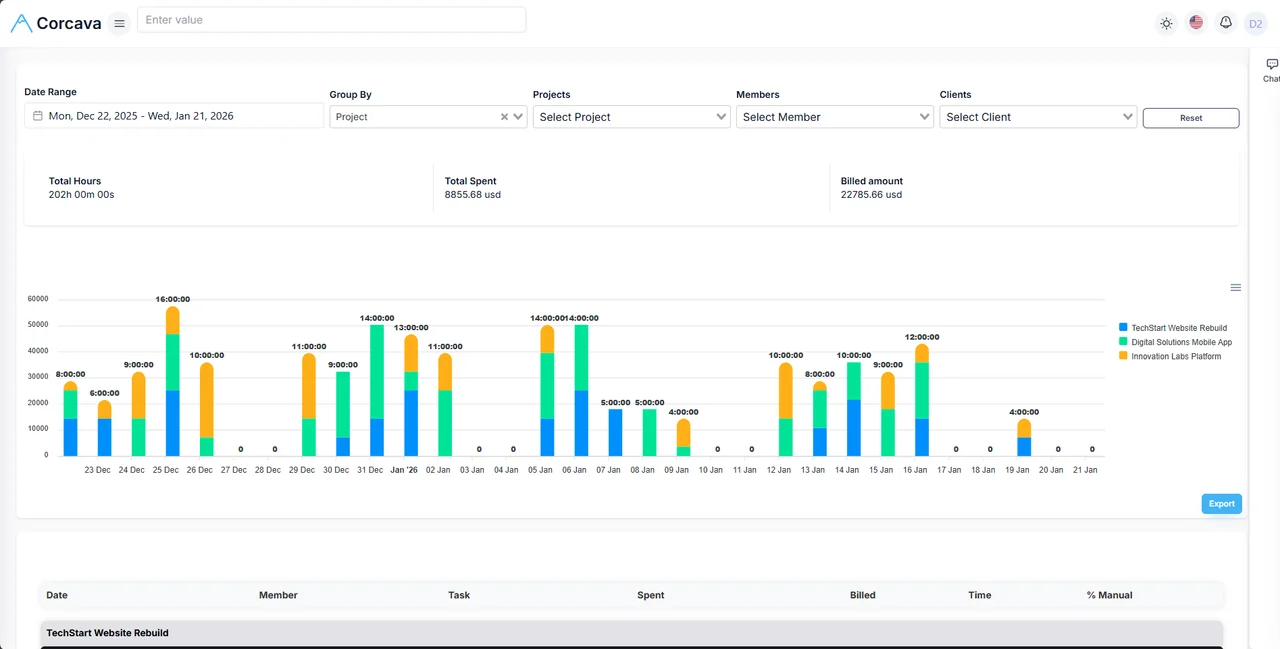
One operating record, several useful views
When tasks, time, invoices, and client context live in separate tools, every status meeting starts with exports. Someone rebuilds the same pivot table, emails a PDF, and hopes the numbers still match what billing sent.
Corcava reports draw from the same project and client records your team already uses for delivery and billing. Filter, group, and export from live operational data — then act in invoicing, Project Finances, or the client portal without re-entering context.
Report categories built from your delivery data
Each view answers a specific operational question. Corcava does not offer drag-and-drop custom dashboards or marketing-performance analytics.
Time and billability
Question: Where did hours go, and were they billable?
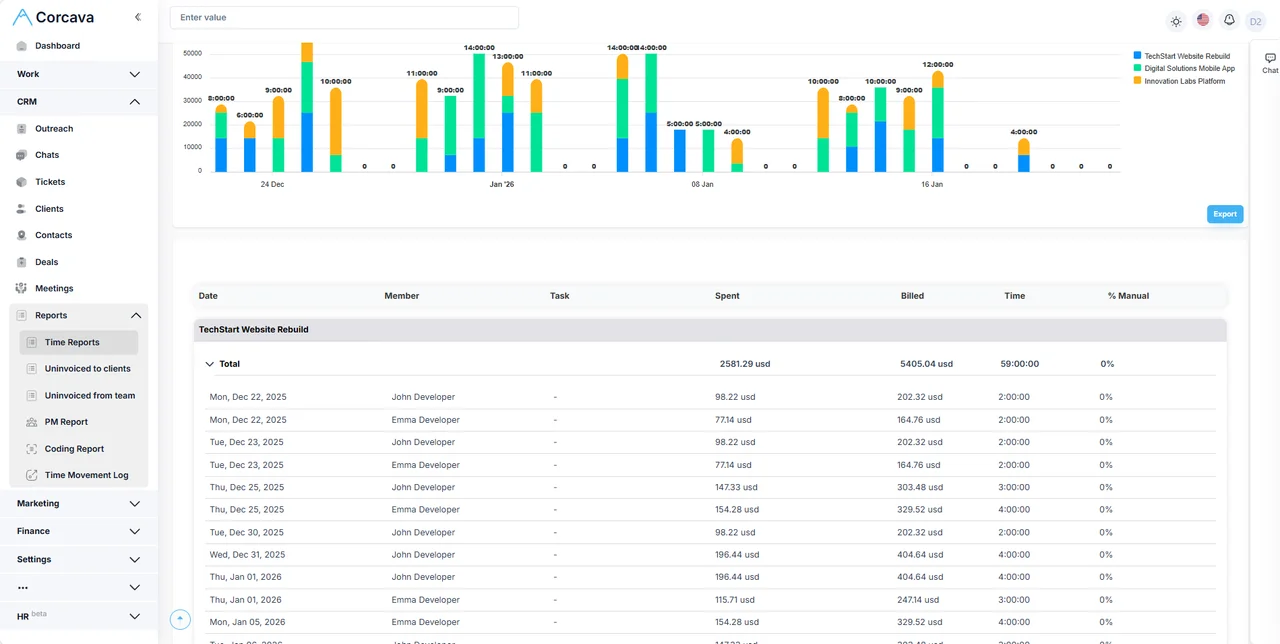
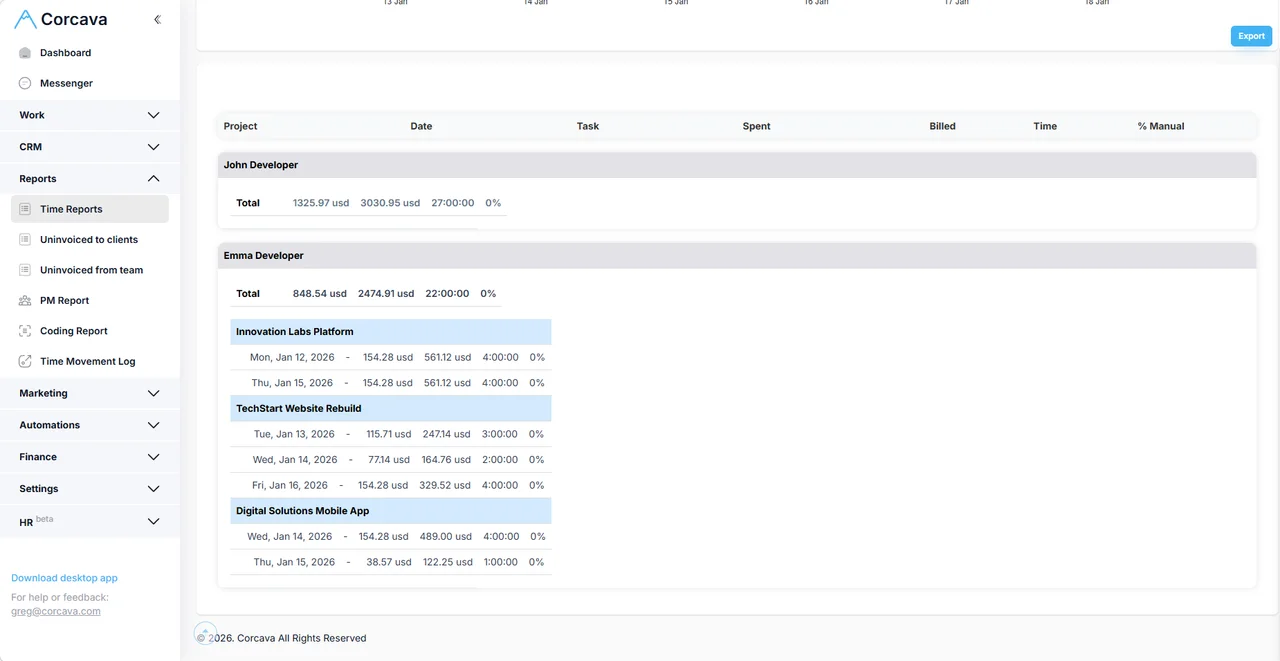
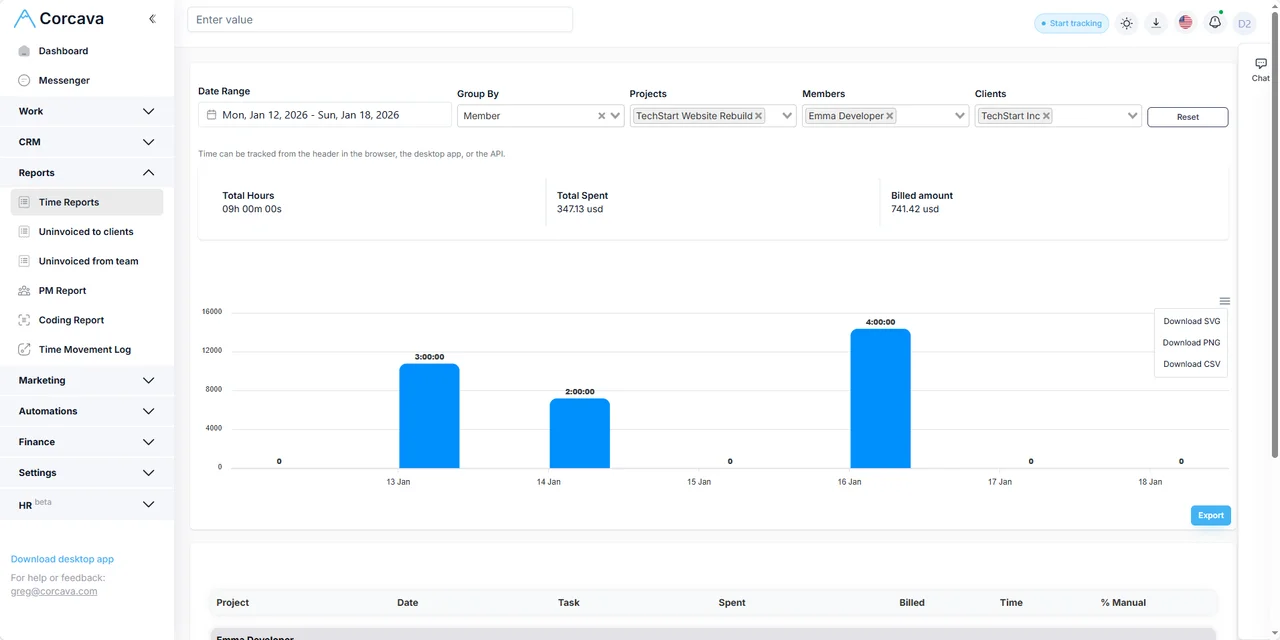
Filter by date range, project, member, client, or task. Chart and table views with expandable detail rows.
Next action: Invoice approved time or adjust project assignments.
Spent vs billed
Question: Does internal cost align with billable value?
Pay rates produce spent totals; bill rates produce billed amounts — when your role can see them. Multi-currency sums with approximate base-currency consolidation.
Next action: Review margin signals before the engagement closes.
Uninvoiced work
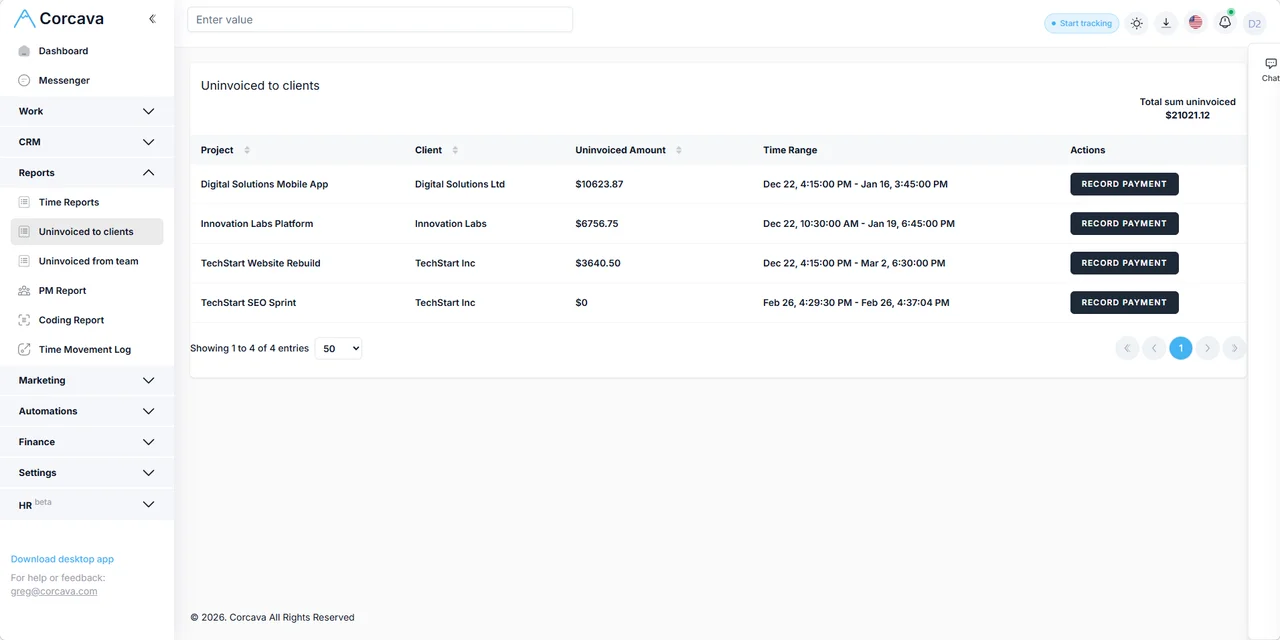
Question: What billable work has not been invoiced yet?
Separate views for uninvoiced-to-client and uninvoiced-from-team work, grouped by client, project, or member.
Next action: Create or schedule client invoices before month-end.
Weekly target hours
Question: Is recorded time on pace with the weekly target?
Optional per-user weekly targets (Monday–Sunday) compared against tracked hours. Visible to the user and managers — not clients.
Boundary: Target tracking is not resource forecasting or capacity planning.
Client reporting
Question: What can the client see about delivery progress?
Share time reports and project status through the client portal or exports you choose to send. Granular permissions per client.
Boundary: Ad performance, SEO rankings, and accounting statements stay in their specialist systems.
Project Finances
Question: What money moved on this project?
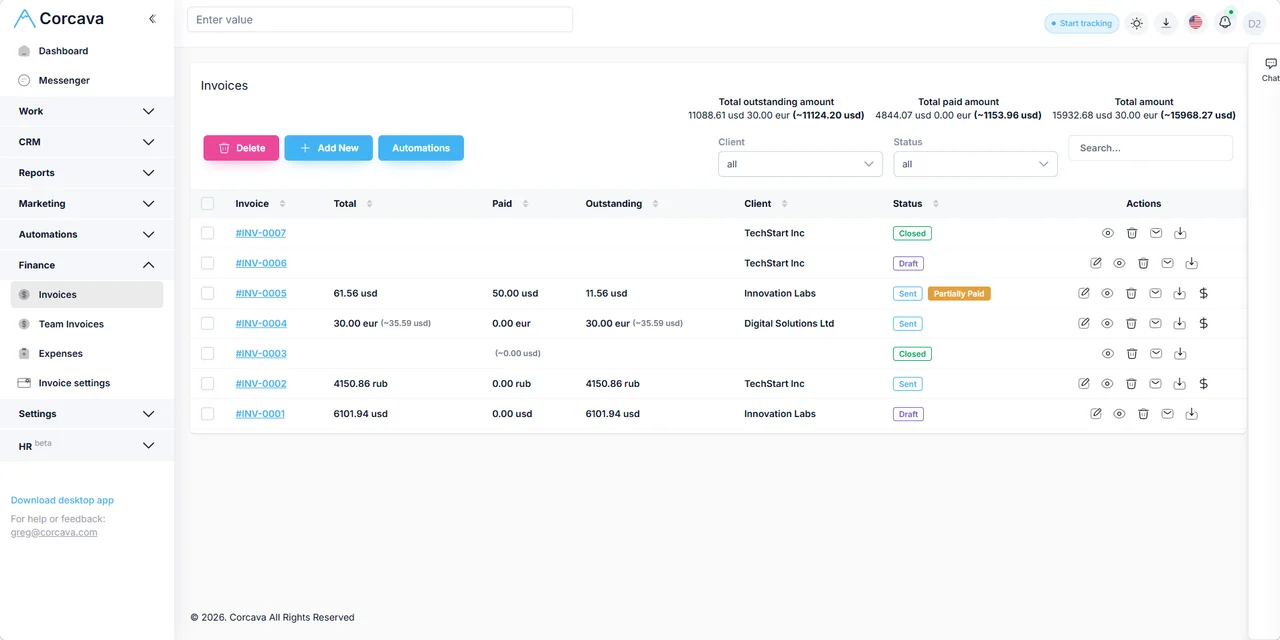
The Project Finances tab is a per-project ledger: client invoices in, team invoices and expenses out. Spent-vs-billed lives in time reports.
Next action:Open Project Finances for ledger detail.
Four decisions reports should help you make
Agency owner: find uninvoiced work before month-end
Open the uninvoiced-to-client report filtered to the current month. Sort by billable value. Create invoices for the top rows before closing the books — no separate WIP spreadsheet.
Project manager: compare recorded time with the weekly target
Check each delivery lead’s tracked hours against their optional weekly target. If someone is consistently under target mid-week, reassign work before the sprint slips — this is recorded effort, not a forecast of future capacity.
Account manager: assemble a client delivery update
Filter the time report to the client’s active projects, export to Excel, or point the client to their portal view. Describe completed and in-progress deliverables — not ad ROAS or SEO rankings from external tools.
Owner: compare billed value and cost across projects
Group the time report by project with spent and billed columns visible. Cross-check high-spent projects in Project Finances for invoice and expense activity. Corcava does not show one headline margin-percentage dashboard — you interpret the totals together.
Operational reporting vs specialist analytics
Corcava reports answer delivery and billing questions from work your team records: tasks completed, hours logged, invoices sent, expenses attached. They do not replace:
- ✗Marketing analytics — ad spend, conversions, email open rates, campaign ROAS (stay in ad platforms and ESPs)
- ✗SEO rank tracking — keyword positions and search visibility (stay in SEO tools)
- ✗Formal accounting — general ledger, tax filings, revenue recognition (stay in QuickBooks, Xero, etc.)
- ✓Client service operations — who worked on what, for which client, under which project, with what billable and financial outcome
For dev teams, Coding Report adds Git activity alongside tracked time — a specialized view, not a substitute for this reporting hub.
Export and permissions
- →Excel export — download the current filtered time report for sharing or further analysis.
- →Pay-rate visibility — spent (internal cost) columns appear only for roles with permission. Billed amounts may be visible more broadly.
- →Automated email summaries — optional daily or weekly work summaries to your inbox, including progress toward weekly targets where configured.
- →Quick questions — the AI assistant can answer ad-hoc time and activity questions without building a full report.
Frequently asked questions
What is project reporting software?
For service teams, it means turning project, time, and billing data into views that help you decide what to invoice, reassign, or escalate. Corcava focuses on operational delivery reporting connected to the same records used for invoicing and client access.
Which Corcava reports are available?
Filtered time reports (with spent and billed when permitted), uninvoiced work reports, financial summary widgets, Project Finances ledger views, client portal reports, automated email summaries, and optional Coding Report for dev teams.
Can I report time by client, project, task, or team member?
Yes. Time reports support date-range filters and grouping by project, date, member, client, or task, with expandable detail rows and Excel export.
Can clients see reports or project status?
Yes, through the client portal when you grant access. Clients can view permitted time reports, project boards, and invoices. You control what each client sees.
Can reports be exported?
Time reports export to Excel with your current filters applied. Other report types may offer export where documented in the product.
Does Corcava provide marketing-performance or accounting reports?
No. Corcava reports operational delivery and billing data. Marketing metrics and formal accounting remain in their respective specialist tools.
Who can view pay rates and project finances?
Permission settings control visibility of pay rates, spent amounts, and financial detail. Configure roles so delivery leads see billable data while finance roles see internal cost.
Project Finances
Per-project ledger: invoices in, team costs and expenses out.
Time Tracking
The source data behind every time and billability report.
Invoicing
Turn approved billable work into client invoices on the same project.
Expenses
Project expenses that appear in financial views.
Client Portal
Client-visible progress, time reports, and invoices.
Profitability calculator
Quote-time margin modeling before delivery starts.
Consulting software
Practice workflow from deal to invoice for consultancies.
Professional services automation
PSA category: CRM, delivery, time, billing, and reporting connected.
See what your team already recorded
Filter, group, and export operational reports without rebuilding spreadsheets.
Start free 14-day trial →No credit card required