
 +Corcava
Upwork Operations Hub
Connect Upwork agency accounts, map contracts to projects, sync time automatically, and run direct clients in the same workspace — so hybrid freelancers and agencies stop juggling dashboards.
No credit card required · $9/user/month, all features included
Corcava is an operations layer for contracts you already won: map contracts to projects, compare channel economics, and import or sync Upwork time for agency organizations (not freelancer-only profiles). It does not replace Upwork search, proposals, or Connects bidding inside Upwork.

The hybrid Upwork workflow
One spine for agencies and freelancers who win on Upwork but also bill direct clients — no separate CRM, tracker, and invoice app for each channel.
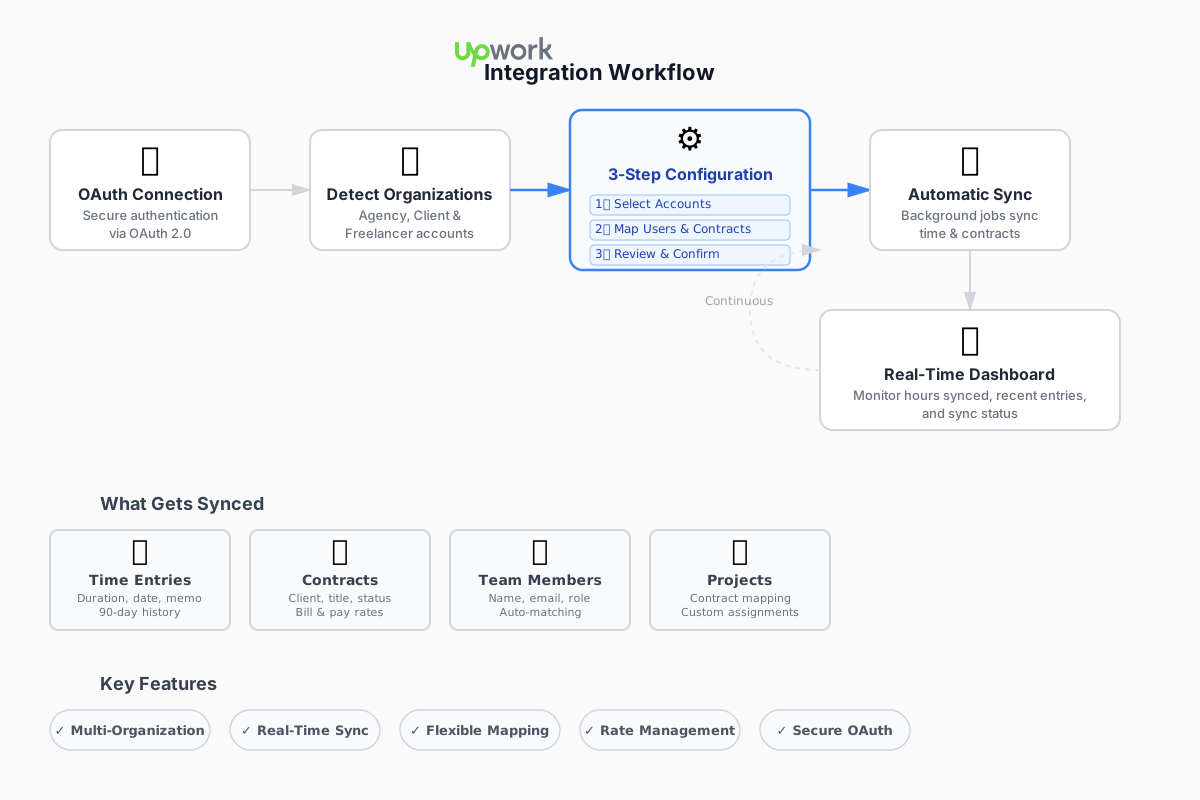
1. Connect
OAuth to Upwork; import contracts and up to 90 days of history
2. Map
Link freelancers to team members; map each contract to a Corcava project
3. Sync time
Upwork hours flow in automatically (agency orgs); direct work tracked in Corcava
4. CRM + direct
Add contacts and deals for direct clients in the same workspace
Worked example: hybrid freelancer with two Upwork contracts and one direct client
Alex runs a 4-person dev shop. Two active Upwork agency contracts ($85/hr and $70/hr bill rates) plus a direct retainer client at $95/hr. Before Corcava, Alex exported Upwork CSVs, re-entered hours for the direct client, and guessed margin after fees.
Upwork contract A
- Map contract → project “Acme API rebuild”
- Bill rate $85/hr from contract; pay rate $45/hr to subcontractor
- ~32 synced hours last week
Upwork contract B
- Map contract → project “Beta mobile fixes”
- Bill rate $70/hr; Alex tracks own time on this one
- Hours sync every few hours automatically
Direct client (Northwind)
- Contact + deal in CRM → client + project
- Time tracked in Corcava desktop tracker
- Monthly invoice from uninvoiced hours
Result: One dashboard shows hours and margin across all three engagements. Alex uses the Upwork fee calculator to compare effective rates after platform fees vs the direct retainer — without exporting three spreadsheets.
For the full agency story (bidding pipeline, team roster, invoicing), see Upwork agency management software and agency management.
Upwork CRM: link platform clients to your pipeline
Corcava does not auto-import Upwork clients into CRM contacts or deals today. Contracts store the Upwork client name — you connect the business side manually. That keeps your pipeline accurate and lets you track direct repeat work when a Upwork client goes off-platform.
When a contract starts
- 1.Map the Upwork contract to a Corcava project (wizard or edit screen)
- 2.Create a CRM contact for the Upwork client name if you want pipeline history
- 3.Optional: log the win in outreach so Connects spend ties to the deal
- 4.Time syncs; bill and pay rates sit on the mapped project
When they hire you direct
- 1.Same contact record — add a new direct client and project
- 2.Track time in Corcava (not Upwork) for off-platform work
- 3.Invoice from uninvoiced hours; client pays via portal if you use it
- 4.Compare channel profitability in Project Finances and reports
Setup: connect, map, sync
Agency accounts get full time sync after you map users and contracts. Client-type Upwork organizations can be connected for visibility; automatic time sync targets agency orgs.
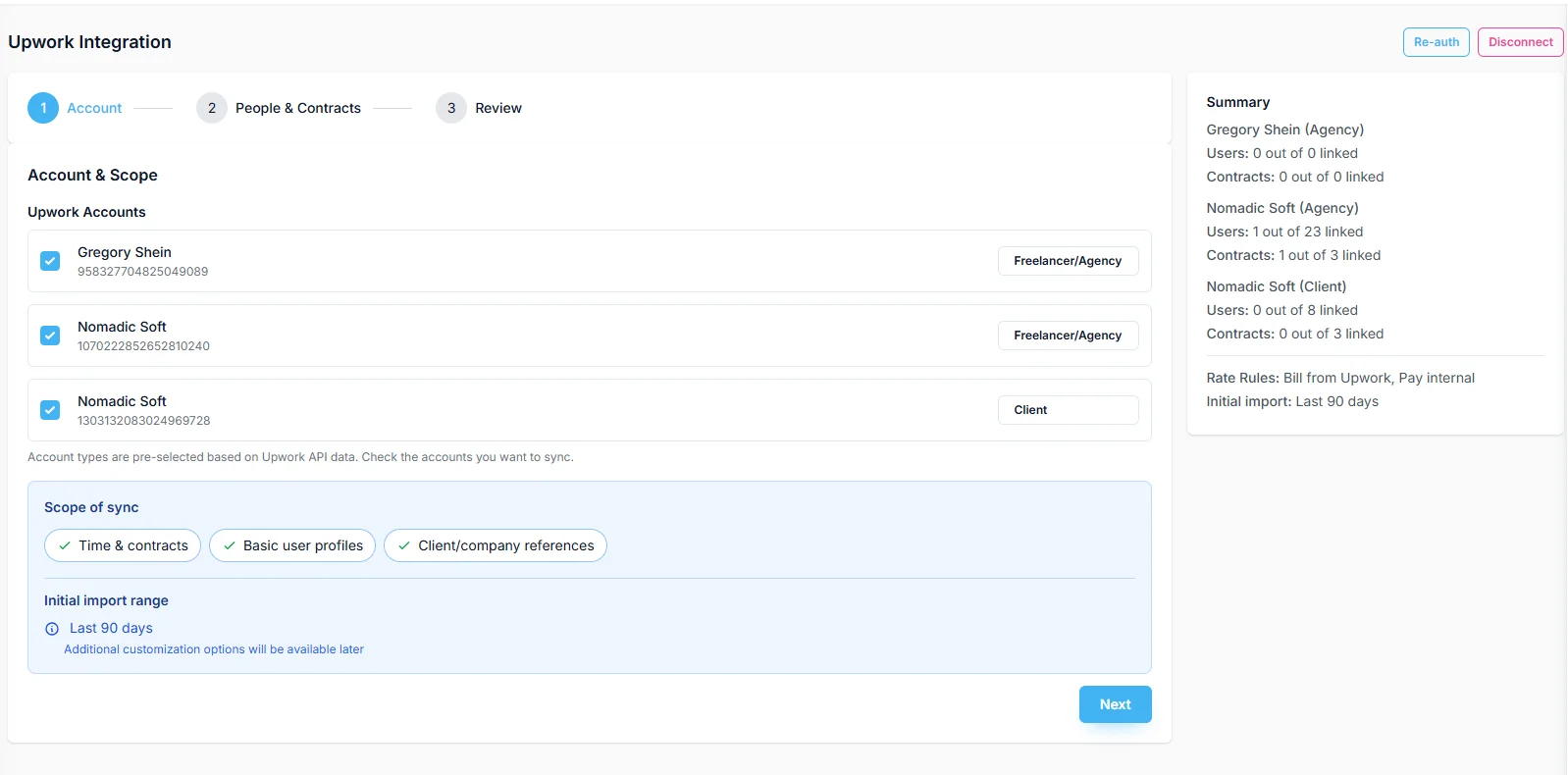
Select organizations
OAuth connect shows all Upwork orgs with type badges (agency, freelancer, client). Choose which to include; first sync can import up to 90 days of history for agency time.

Map users & contracts
Match Upwork freelancers to Corcava users (auto-match by name or pick manually). Map each contract to a project; set bill rate and pay rate for margin tracking. Create projects or users on the fly if needed.
Review & monitor
Confirm mappings, start sync, then use the status dashboard for hours synced today, recent entries, and connected orgs. Background sync runs on a schedule; refresh manually anytime.
Deep dive on time sync →
Rates, margin, and uninvoiced time
Agency accounts
Contract rate becomes bill rate (what the end client pays). You set pay rate (what you pay the freelancer). Project Finances and uninvoiced reports show whether each contract actually earns after pay and fees.
Try the profitability calculator →Bidding & acquisition cost
Log Connects and proposal effort in outreach; tie wins to projects. Dashboard widgets help you see deal flow and uninvoiced totals — use them alongside the fee calculator for channel comparison, not as a substitute for your books.
Platform bidding workflow →Related resources
Upwork agencies
Commercial page: bidding, hybrid ops, team roster
Time sync
Automatic Upwork hours in Corcava
Fee calculator
Effective rate after Upwork fees
Connects ROI calculator
Cost per proposal, reply, and won contract
Upwork Connects glossary
What Connects cost and how they affect margin
Project Finances
Bill vs pay and uninvoiced work per contract
Upwork to direct clients
Hybrid agency guide — one system, 5-day migration checklist
Setup docs
Step-by-step integration guide
Frequently asked questions
Which Upwork account types sync time?
Agency accounts get full contract import and automatic time sync after mapping. Freelancer profiles connect through the same OAuth flow. Client-type organizations can be linked for visibility; automatic time sync is built for agency operations, not client hiring accounts.
Does Corcava import Upwork clients into CRM automatically?
No. Contracts carry the Upwork client name; you create CRM contacts and deals when you want pipeline tracking. That way direct repeat clients stay on one record when work moves off-platform.
How often does time sync?
Background jobs sync on a schedule (roughly every few hours). Use the status dashboard to refresh manually and see hours synced today plus recent entries.
Can I map one contract to one project?
Yes. Each contract maps to a Corcava project with its own bill rate, pay rate, and sync toggle. You can create a new project during mapping or link an existing one.
What about historical time?
First sync can import up to 90 days of Upwork time for mapped contracts. Existing Corcava time entries are not overwritten.
Is my Upwork data secure?
OAuth 2.0 — you never share your Upwork password with Corcava. API access uses the minimum permissions needed for contracts and time.
Run Upwork and direct clients in one workspace
Connect your agency account, map contracts once, and stop double-entering time.
14-day free trial · No credit card required