
Sales and delivery
CRM and project management connected by agreed scope
Updated
Move from a linked contact and deal to a priced estimate, then create the delivery project from the accepted version. Corcava carries the deliverable lines into tasks while you decide when to start, who owns the work and when it is due.
Follow the CRM to delivery walkthroughOpen Corcava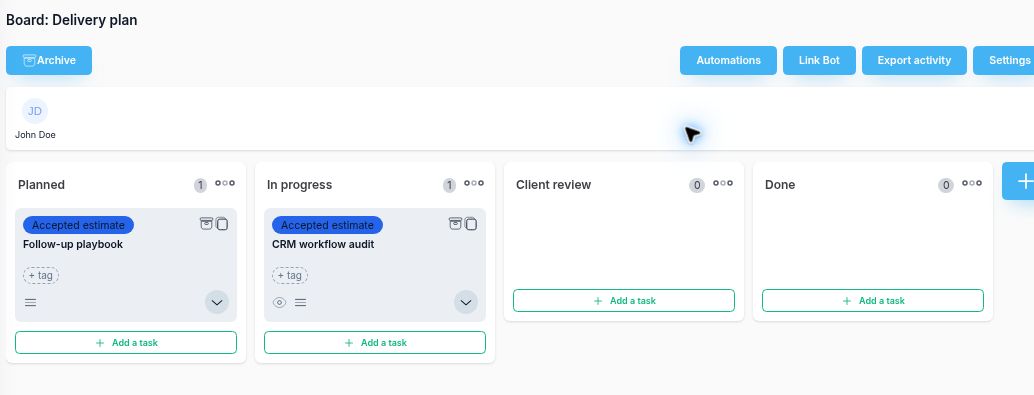
Keep the sales decision and delivery plan connected
CRM and project management answer different questions. The deal tracks the opportunity; the estimate defines the offer; the project organizes the work. Keeping those records linked gives the delivery team a clear place to check what was agreed.
1. Check the offer
Create the estimate from the deal and verify Client, Contact and Deal. Add priced deliverable lines and optional effort estimates. Finalize for review, then check the recorded acceptance; Sent or Viewed alone is not approval.
2. Create the project
After acceptance, choose Create project. This explicit action creates a new project for the estimate client and a Delivery plan board. It does not happen when you drag a deal to another pipeline stage.
3. Plan the delivery
Each accepted line becomes a task with its name, description and effort estimate. Review the generated tasks, then set assignees and dates. Work moves through Planned, In progress, Client review and Done.
What carries into the example project?
Northstar CRM workflow audit (Demo) uses Morgan Lee (Demo) as its fictional contact. The estimate contains two quantity-1 lines totaling $1,250: CRM workflow audit at $750 with 360 minutes of effort, and Follow-up playbook at $500 with 240 minutes. The demonstration and its recorded acceptance are nonbinding fictional examples, not real client consent.
| Record | Result of Create project | Your next review |
|---|---|---|
| Project | New project named after the estimate, linked to its client | Confirm the delivery team and kickoff needs |
| Delivery plan board | Planned, In progress, Client review and Done columns | Decide owners, dates and review checkpoints |
| Two deliverable tasks | CRM workflow audit: 6 hours; Follow-up playbook: 4 hours | Review the descriptions and assign the work |
The conversion creates one task per line, regardless of quantity. Repeating it for this same accepted estimate returns the existing project and board. It does not attach the tasks to another project or merge separate estimates.
Keep progress, effort and billing distinct
Update the delivery tasks as work progresses and record time against the project or task to review effort. In this fixed-price example, the accepted fee remains $1,250. Create draft invoice is a separate action on the accepted estimate; review its quantities, prices, currency and dates before sending.
That estimate-derived invoice does not consume the project's time entries. Treat the recorded time as delivery evidence and do not bill those same fixed-price deliverables again through a time invoice. The full workflow guide shows the individual actions and review points.
Prepare client updates using the project status report template. Record proposed additions separately with a change request form before changing the agreed scope.
For the later billing follow-up, the invoice tracking guide covers invoice status, recorded payments and the remaining balance.
Questions about CRM with project management
How does CRM connect to project management in this workflow?
The deal links to an estimate with a selected client and contact. After acceptance, a separate Create project action creates a new project for the estimate client, a Delivery plan board and one task for each accepted line item. The estimate remains the reference for the accepted scope.
Does a pipeline stage change automatically create a project?
No. Changing the deal stage does not run this conversion. The workflow uses the explicit Create project action on an accepted estimate, with project-creation permission. Acceptance itself does not create the project or change the deal stage.
Can the accepted estimate add these tasks to an existing project?
This conversion creates a new project and board. It does not add the accepted lines to an existing delivery project. Repeating the conversion for that same estimate returns its existing project and board.
What happens to task estimates, dates and assignees?
Each accepted line creates one task, regardless of quantity. Line-item Effort in minutes becomes the task time estimate in hours. Set delivery dates and assignees separately after conversion; the contact is not automatically assigned to the work.
How does the fixed-price invoice relate to tracked time?
Create draft invoice is a separate action on the accepted estimate. It uses the accepted quantities and prices and creates an unsent draft. Time recorded on the project is effort evidence; this invoice does not consume those time entries. Do not create another time invoice for the same fixed-price work.
Explore the connected workflow
Start with the worked example, or inspect the product views for CRM and project management. Consultants can also use the consultant CRM evaluation.
Read the complete walkthrough