
CRM with invoicing: connect the client, the work, and the payment
Updated
Keep client details, deals, projects, invoices, and payment records in one workspace. Build the invoice from the agreed work, then follow the balance through to payment.
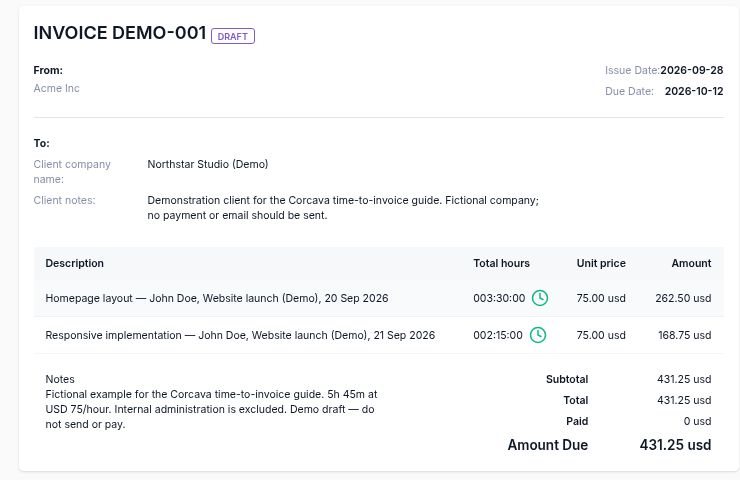
Keep the billing context with the client
An invoice needs more than a client name and an amount. The billing person needs the agreed scope, the work being charged, the due date, and any payments already received.
Client and deal
Use the client billing details and currency. Link an invoice to its deal to keep the commercial context accessible.
Project and work
Generate line items from selected uninvoiced time, or add manual lines for agreed fixed-fee work and milestones.
Invoice and payments
Review the invoice total, recorded payments, and amount outstanding. Keep payment dates and notes with the invoice.
From agreed work to a recorded payment
1. Confirm the client and scope
Set the billing details, currency, and payment terms. Keep the deal and project associated with the right client so delivery and billing use the same context.
2. Prepare a draft
Choose manual lines, generate lines from selected time, or convert a client-accepted estimate into a separate draft invoice. An estimate and an invoice remain separate records.
3. Review and issue
Check the line items, currency, issue date, due date, and any adjustments before sending. A saved draft is preparation, not a payment request already delivered to the client.
4. Share the invoice
Use the invoice email action or share its public link. The public document displays the total, recorded payments, and amount due. Online payment actions depend on the configured provider and invoice eligibility.
5. Record received payments
On a Sent invoice, Record Payment accepts the date, amount, and notes. A partial payment reduces the balance; recording the full remaining amount closes the invoice. Manual recording does not move money.
6. Follow up on the remainder
Check the due date and payment history before contacting the client. Re-send the invoice when needed, and keep the next follow-up date in your working process.
For the full time-based example, follow the time-to-invoice walkthrough. For the payment controls and checks, see how to track invoices in Corcava.
See what is still waiting for payment
In this fictional demo, DEMO-002 has USD 250 recorded against USD 750, leaving USD 500 to collect. DEMO-001 is still a draft, and DEMO-003 has been fully recorded as paid.
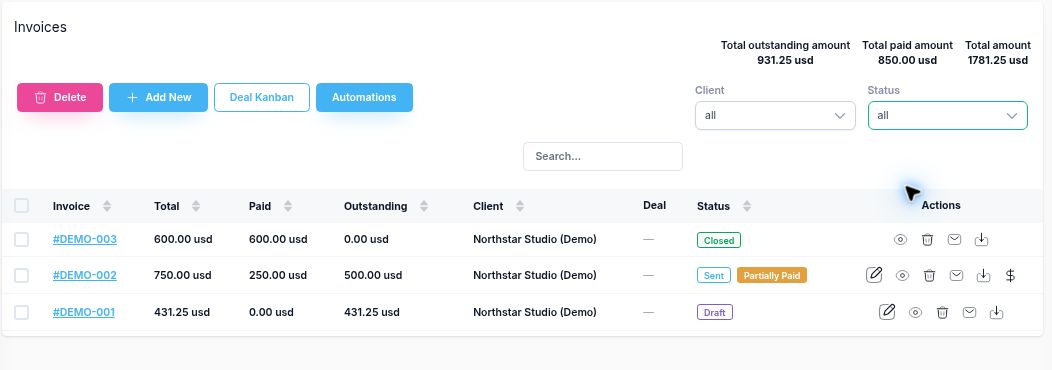
Open is a combined filter for Draft and Sent invoices. It is not an overdue filter. Check an issued invoice's due date and remaining balance before deciding that it needs a reminder.
Closed also needs context: an invoice can be closed manually without recording a payment. Use the paid amount and payment history to confirm receipt. The worked tracking guide explains each screen and the totals.
What Corcava records, and what your team decides
| Stage | Corcava records | Your team's action |
|---|---|---|
| Invoice preparation | Client, line items, dates, currency, and linked deal | Confirm the work and terms before issue |
| Time billing | Generated lines linked to selected time when saved, including drafts | Set effective bill rates and select the right dates and project |
| Payment | Received amounts and the remaining balance | Verify external receipt before entering a manual payment |
| Collection | Invoice and payment history; re-send action | Check due dates, resolve questions, and choose the next reminder |
The invoice screen does not provide a native timed overdue-reminder sequence. Keep financial reporting, tax, and your general ledger in your accounting workflow.
Use the part you need today
Invoice tracker spreadsheet
Track issued balances, partial payments, overdue days, and next actions in a downloadable workbook.
Invoice emails and reminders
Copy a sending email, an overdue reminder, or a partial-payment follow-up and adapt it to your client.
Invoicing features
Explore line items, time-based billing, client access, payment records, and project finances.
Frequently asked questions
What does CRM with invoicing mean?
It combines client and deal records with invoice creation and payment tracking. In Corcava, the client, project work, invoice, and received payments remain connected so the billing team can check the context behind a balance.
Can I create an invoice from tracked time or an estimate?
Yes. Generate invoice lines from selected uninvoiced time, or convert a client-accepted estimate into a separate draft invoice. Review the draft before issuing it. Saving generated time lines already links that time to the invoice.
Can clients view an invoice without signing in?
Yes. Public Link opens a client-facing invoice document with its total, recorded payments, amount due, and download option. Online payment actions depend on the configured provider and invoice eligibility.
How do partial payments work?
Record the payment date, amount, and notes on a Sent invoice after verifying receipt. A partial payment reduces the balance and leaves the invoice Sent. Recording the full remaining amount closes it. Manual payment recording does not charge the client.
Does Open mean overdue, and does Closed mean paid?
No. Open combines Draft and Sent invoices. Check an issued invoice’s due date and unpaid balance to identify overdue work. Closed can also be set manually, so confirm payment using the paid amount and payment history.
Does Corcava automatically send overdue reminders?
The invoice screen offers a re-send action but does not provide a native timed overdue-reminder sequence. Review the current balance and choose the follow-up message and date in your working process.
Keep client work and billing together
Manage the client, prepare the invoice, and follow the recorded balance in one workspace.
Start Free TrialNo credit card required · See pricing