
Crypto agency kit
Client invoices in.
Team payouts out.
Get paid in crypto, pay the people doing the work, and keep every payment connected to its invoice. One workflow for your agency, inside Corcava.
No credit card required. Crypto payments require workspace setup.


From client payment to contractor payout
Keep the money side of agency work together.
Your client invoice, contractor invoice and payment record belong in the same workspace as the work. Give each payment a clear destination, approval and status.
Invoice your clients
Share an invoice with crypto receiving instructions or an eligible checkout. Verify the receipt and keep it attached to the invoice.
Pay your contractors
Review an approved team invoice, its saved wallet destination and the fee before releasing a stablecoin payout.
Follow the payment trail
See incoming and outgoing activity, open the related invoice and check what has completed or needs attention.


Incoming / Client invoices
A proper invoice.
A crypto way to pay.
Give clients one place to see the amount, asset, network and receiving instructions. With exchange receiving, the client submits their transaction hash and your team matches the credited deposit to the invoice.
- Receive any of the nine supported stablecoins through a configured Binance, Bybit or OKX account on supported networks.
- Give the payer clear submission feedback and an Awaiting verification status while your team checks the receipt.
- After the full payment is matched, show Paid and the updated balance automatically.
Exchange receiving supports eligible USD invoices with an agreed 1-token-per-USD rate and an exact full-balance receipt. Hosted ATLOS/PassimPay and enabled direct TronLink checkout are separate options.
The exchange receiving flow
A clear status at every step.
Payment due
The client checks the instructions and sends the exact amount on the selected network.
Awaiting verification
The hash is submitted. Your team checks the exchange deposit and matches the credited receipt.
Paid
The recorded payment covers the invoice. The payer sees confirmation and nothing more due.
Submitting a hash does not mark an invoice paid. Your company verifies and matches the receipt.
Outgoing / Contractor payouts
Know who gets paid.
And exactly what it costs.
Pay an approved USD team invoice through Binance, Bybit or OKX. The preview separates what your contractor receives, the fee and the total debited from your company account.
- Contractors save their asset, network and wallet address with email confirmation.
- An authorized workspace admin reviews and confirms the payout with an email code.
- Your company covers the fee on top of the approved recipient amount.
Pay individual USD team invoices in any of the nine supported stablecoins on supported networks. Availability depends on the exchange account, region and recipient.
The record / Transactions
Less “did it go through?”
More payment context.
Follow matched client receipts and contractor payouts in a shared Transactions view. Check the invoice, amount, fee and provider reference, with a blockchain transaction hash when one is available.
Incoming & outgoing
See both directions
Filter incoming payments and outgoing payouts, follow their status and export the activity for reconciliation.
Pending & unresolved
Keep uncertainty visible
Pending and unresolved payments stay visible. An uncertain payout is checked before another attempt can be made.
Recheck & resolve
Handle the exceptions
Get actionable reasons for known provider restrictions, with rechecks and recovery history for payments that need attention.
Coins, networks & accounts
Choose your payment path.
Choose from nine stablecoins for exchange receiving and contractor payouts. The exact token and network must be available on your connected exchange account; account, region, deposit and withdrawal rules apply.
 USDT
USDT TRON
TRON  Ethereum
  USDC + 7 more stablecoins
USDC, DAI, FDUSD, PYUSD, USDP, TUSD, RLUSD and USD1
Ethereum
| Payment method | How it works |
|---|---|
| Exchange receiving | Receive the stablecoins listed here into a configured Binance, Bybit or OKX account. Eligible USD invoices at an agreed 1-token-per-USD rate. Your team explicitly matches one fully credited on-chain deposit for the exact balance. |
| Hosted client checkout | ATLOS or PassimPay. Assets, networks and quotes come from your configured provider. |
| Direct client checkout | USD invoices paid in USDT on TRON through TronLink, where enabled. Full outstanding balance; the payer covers network fees separately. |
| Team payouts | Pay individual approved USD invoices in the same nine stablecoins, on the listed networks. The company covers the quoted fees. |
| Payout accounts | Binance Spot or Funding wallet; Bybit or OKX main-account Funding wallet. Account and regional restrictions apply. |
| Transaction tracking | Payments handled through Corcava, with invoice links, status, references and exports. |
See the flow
Follow a real 10 USDT payment.
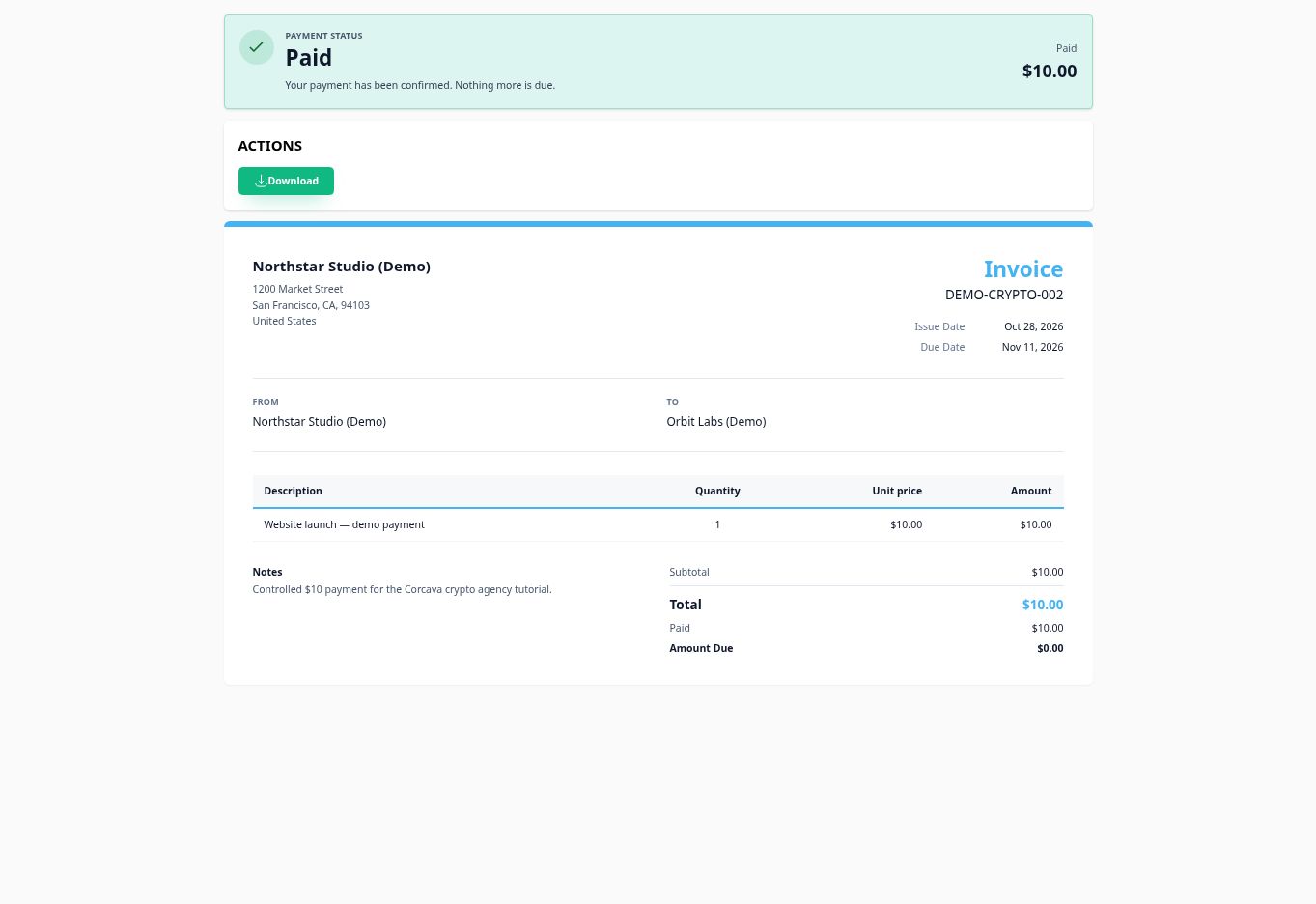
See how a USD 10 demo invoice becomes paid: publish Binance receiving instructions, submit the transfer hash, verify the credited deposit and match it to the invoice.
The guide uses fictional business records and a real receipt, verified on October 28, 2026. The result is one completed transaction linked to its invoice.
Read the illustrated payment walkthroughActual Corcava transaction
10 USDT received. Completed. Linked.

A few useful details
Before your first payment.
Can I use it with the rest of my agency workflow?
Yes. The kit brings together payment features in Corcava, alongside your clients, projects, time tracking and invoices. Explore the agency workspace.
Which stablecoins can I receive and pay out?
Exchange receiving and contractor payouts support USDT on TRON (TRC-20) or Ethereum (ERC-20); USDC, DAI, FDUSD, PYUSD, USDP, TUSD, RLUSD and USD1 on Ethereum (ERC-20). Availability depends on the connected exchange account and its current rules. Hosted checkout has its own provider-supported assets; direct TronLink checkout remains USDT on TRON.
Does my client need a Binance, Bybit or OKX account?
For exchange receiving, your client can send an on-chain transfer from a wallet or exchange that supports the invoice’s exact token and network. They do not need an account with the same exchange as your company. Direct TronLink and hosted checkout have their own instructions.
Why does an invoice say Awaiting verification after the client pays?
The client has submitted a transaction hash. With exchange receiving, your team must use Check deposits, verify the credited receipt and choose Match to invoice. The payer’s page then updates automatically when the recorded payment covers the balance.
Does Corcava hold a shared crypto balance?
No. Exchange receiving sends funds to your selected exchange deposit destination; direct USDT checkout transfers to your workspace’s receiving wallet. Hosted payments follow the provider’s settlement process. Payouts use your connected exchange account, and incoming funds are not automatically moved between its wallets.
What if an exchange rejects a payout or stops responding?
Known restrictions show a reason you can act on, such as insufficient funds, an unavailable network or account requirements. If the outcome is uncertain, the payout remains unresolved while its status is checked. It is not automatically sent again; some cases need investigation with the provider.
Is this a complete crypto accounting system?
The Transactions view tracks payments handled through Corcava. It does not import unrelated wallet or exchange activity or replace your general ledger. Use the invoice trail and exports alongside your bookkeeping records.
Put the workflow into practice
Start with the payment you need to make.
Pay a contractor
Crypto contractor payments. Review supported exchanges, stablecoins, approvals and payment records.
Follow the payout steps
How to pay contractors in crypto. Prepare the destination, review the quote and reconcile the result.
Prepare a client invoice
Free crypto invoice template. Download a blank PDF and editable example before adding your payment instructions.
For a standalone payment request, try the free crypto invoice generator. Add your wallet QR, copy payment instructions and print a PDF without an account.
Crypto invoicing and client payments covers the incoming client payment flow.
Work through the payment details.
Get paid in crypto as a freelancer
Agree terms with an existing client, share the right instructions and reconcile what arrives.
USDT TRC-20 vs ERC-20
Compare receiving support, network requirements and the actual fee quote before sending.
Stablecoin payroll vs contractor payments
Separate payroll administration from payment delivery, approvals and invoice records.
Stripe vs crypto fee calculator
Compare payment costs and net receipts using your own provider, network and conversion quotes.
Your agency. Your accounts. One workflow.
Bring your crypto payments
into the agency workspace.
Create your workspace, connect your payment methods and keep client invoices and contractor payouts in view.
No credit card required