
Client operations · Scope control
Change Request Form Template
Updated
Give a new request a clear decision: what changes, what it costs, which dates move and who approves it. Use the blank form or short email below before adding the work to your delivery plan.
Download the blank change request form
A printable PDF with space for the request, impact, options and decision record. The completed example below shows a proposal that is still awaiting written approval.
Download PDFFree download. No email required.
Copy the change request form
CHANGE REQUEST
Request ID / date: [...]
Client / project: [...]
Requested by / coordinator: [...]
Status: [proposed / pending decision / approved / declined]

CURRENT BASELINE
Agreed deliverables and exclusions: [...]
Agreed price and target dates: [...]
Agreement / plan reference: [...]

PROPOSED CHANGE
Requested outcome and reason: [...]
Added work and acceptance criteria: [...]
Estimated effort: [hours]
Rate or fixed-fee basis: [...]
Additional price: [...]
Proposed dates and dependencies: [...]
Other affected deliverables: [...]

OPTIONS
A. Keep the current scope and dates: [...]
B. Approve the change with the stated price and dates: [...]
C. Defer or exchange scope, subject to a revised estimate: [...]

DECISION
Decision requested by: [date]
Authorized approver: [name]
Selected option: [...]
Written approval reference / date: [...]
Records to update after approval: [...]

Until approved, the existing baseline remains in force.
Completed example: CR-001, add a newsletter signup form
Northstar Website Launch is a fictional engagement represented by demo records. This assessment is dated September 28, 2026. The form is filled in; the request is pending written approval.
| Field | CR-001 proposal |
|---|---|
| Coordinator | John Doe |
| Current baseline | Enquiry-form test due October 2; launch approval due October 9. Four of six linked delivery tasks are done (67%). |
| Requested addition | Add a newsletter signup form to the website. |
| Proposed effort and price | 4 hours × $125/hour = $500 additional. |
| Proposed timing | Move launch from October 9 to October 12, subject to written approval by October 2. |
| Decision needed | Approve the added work, $500 price and proposed date, or keep the existing scope. Response requested by October 2. |
| Approval record | Pending. No written approval recorded. |
Before approval, confirm the form’s fields, signup destination and acceptance checks with the client. Those details define what the estimate covers. If the decision arrives after October 2, reassess the proposed date before committing to it.
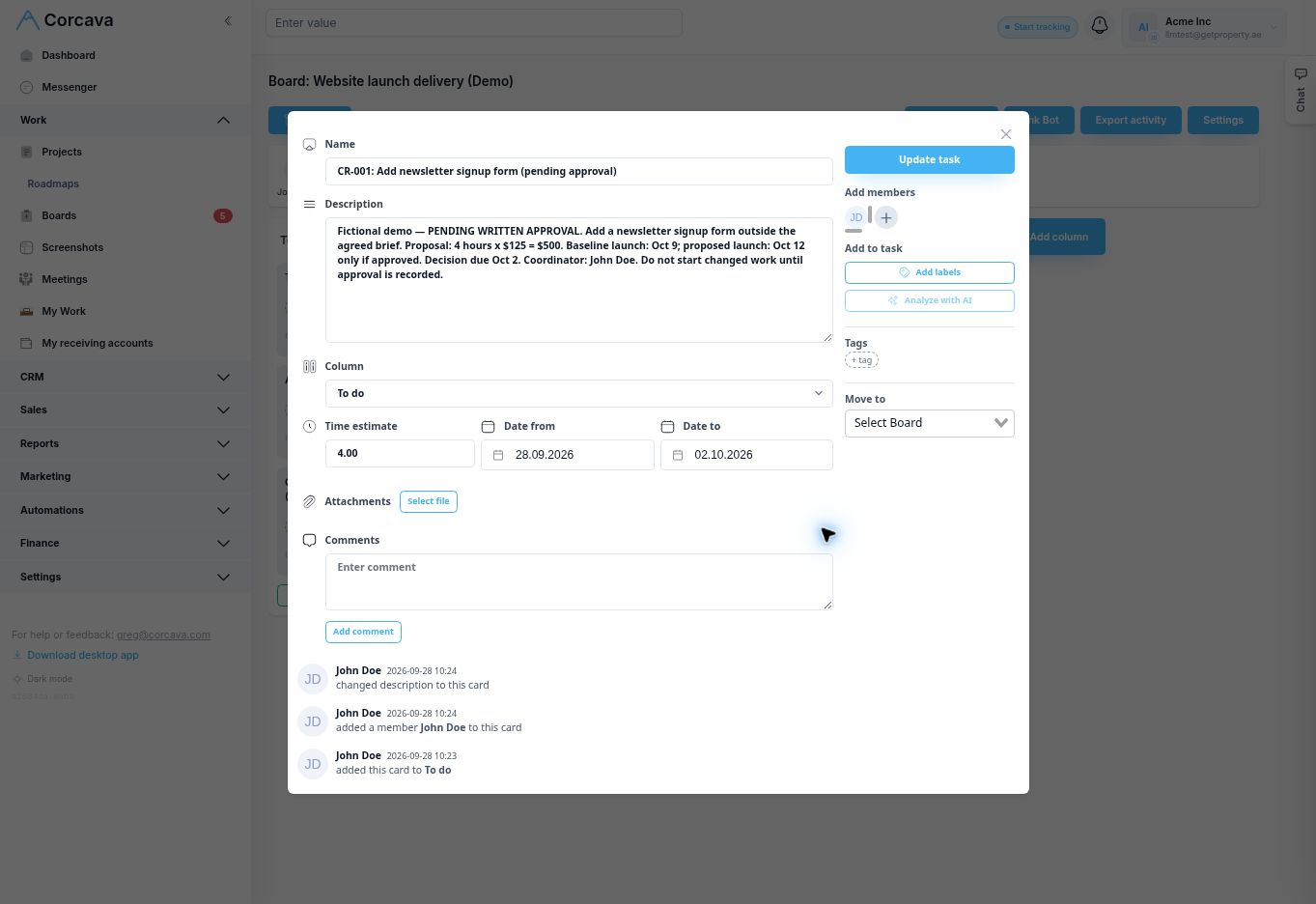
The baseline stays unchanged. The proposed newsletter work is not linked into the delivery roadmap while it is pending. The existing 4/6 task count remains 67%; adding a request does not mean the approved delivery plan has expanded.
Short change request email
Subject: Decision needed by Oct 2 — CR-001 newsletter signup form

Hi [client approver],

We’ve assessed the request to add a newsletter signup form to
Northstar Website Launch.

The proposal adds 4 hours at $125/hour ($500) and moves the
launch target from October 9 to October 12, provided we receive
written approval by October 2.

Option A: Keep the existing scope and October 9 target.
Option B: Approve the added form, $500 price and October 12 target.

Please confirm your selected option in writing by October 2.
We’ll confirm the form details and acceptance checks before
starting the added work. Until approval, the baseline is unchanged.

Thanks,
John
Adapt this draft to the agreed form specification and authorized approver. Send it through your usual communication channel and retain the response.
Move from request to an agreed change
- Record the request. Compare it with the current scope and give it an ID, coordinator and decision date.
- Assess the impact. Include design, implementation, testing and review effort. State assumptions and which existing work the change affects.
- Offer a decision. Make the price and date implications explicit. Keeping the original scope is a valid option.
- Obtain written approval. Record the authorized approver, selected option and reference to their response before beginning the added work.
- Update the baseline. After approval, update the scope, delivery tasks, target dates and billing plan. Explain the change in the next client report.
Keep the assessment visible in Corcava
Use a task for the request, with a coordinator, follow-up date and description containing the proposal. Keep the written decision reference with that record. Review pending requests alongside delivery, then update the plan manually when a change is approved.
The project status report records baseline changes; the weekly report asks for the next decision. The roadmap walkthrough explains how linked tasks affect completion counts.
Frequently asked questions
What should a change request form include?
Include the current baseline, requested change, reason, impact on work and price, proposed dates, alternatives, decision deadline and written approval record. Identify what stays unchanged while the request is pending.
Does a submitted request change the project scope?
No. A request and its estimate are proposals. Keep the agreed scope, price and dates in place until the authorized people approve the change, then update the affected records.
Can I use an email instead of a form?
For a small change, an email can capture the same details. Ask the authorized approver to identify the option and confirm its price and timing, then retain that written response with the project record.
Is completing a Corcava task the same as approving a change?
No. A task can track assessment and follow-up work. Its completion status does not establish client approval. In this example the coordinator records the pending request and obtains written approval separately.
Start with a clear scope of work and onboarding checklist so the original agreement is easy to find when requests arrive.