
Free spreadsheet download
Invoice tracker template
Updated
Keep invoice amounts, recorded payments and next follow-up dates in one place. This Excel template separates draft balances from issued invoices and calculates what remains unpaid and overdue.
Download the editable invoice tracker
One worksheet, 50 prepared rows and three fictional examples. No signup or email required.
Download Excel tracker (.xlsx)An Excel workbook with formulas, filters and a status dropdown. You can also import the file into Google Sheets.
How to use it
- Set the review date and currency. Update As of in J2 before reviewing overdue balances. Use one currency per workbook copy. The currency label in L2 does not convert amounts.
- Replace the fictional examples. Enter your invoice ID, client, issue date, due date, status, invoice total and cumulative paid amount in columns A:G. Include any invoice tax or discount in the final total you enter.
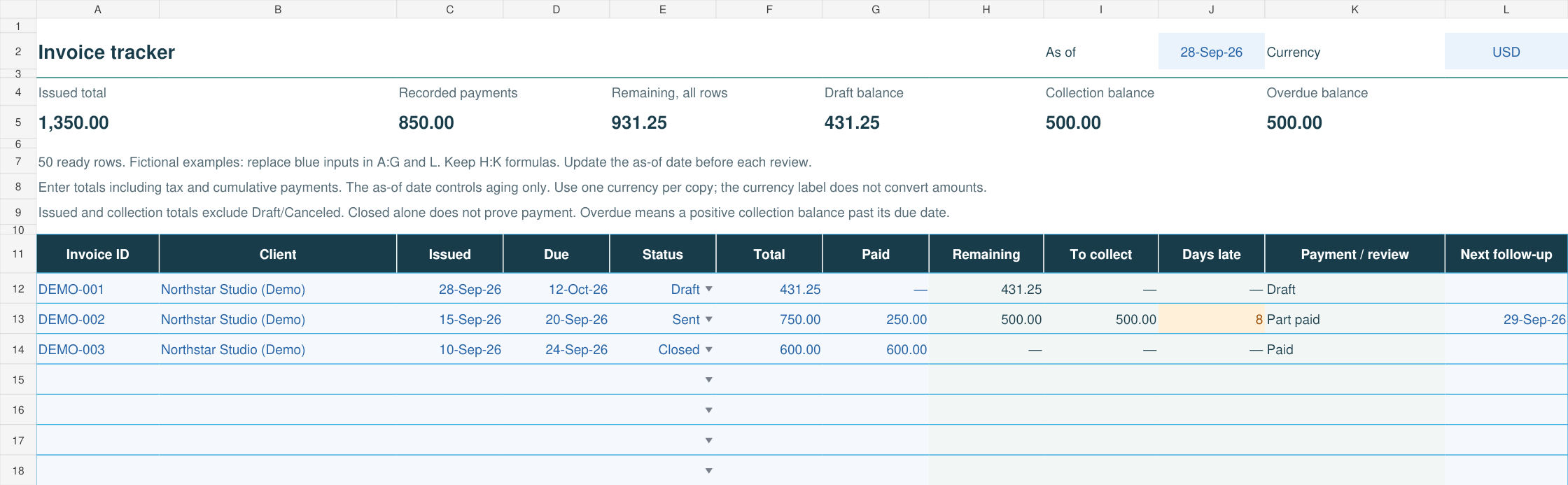
- Keep the formulas. Columns H:K calculate remaining balance, amount to collect, days late and payment/review state. Fifty rows are prepared, from row 12 through row 61.
- Record the next action. Use column L for the next follow-up date. Update it after a reminder or client response; the workbook does not send emails.
- Reconcile before following up. Compare the paid amount with your payment records. Filter the rows to review unpaid balances, late invoices or entries needing a correction.
Paid is the cumulative amount received against that invoice, not just the latest installment. This is a current ledger: the as-of date controls aging, but does not reconstruct historical payments or balances.
What the totals mean
| Figure | Meaning | Example, USD |
|---|---|---|
| Issued total | Invoice totals excluding Draft and Canceled rows. | 1,350.00 |
| Recorded payments | Amounts entered as paid across the ledger. | 850.00 |
| Remaining, all rows | Unpaid amounts, floored at zero for each invoice, including drafts. Overpayments are flagged for review. | 931.25 |
| Draft balance | Remaining amounts still awaiting review and issue. | 431.25 |
| Collection balance | Positive unpaid amounts excluding Draft and Canceled rows. | 500.00 |
| Overdue balance | Collection amounts whose due date is before the as-of date. | 500.00 |
The examples use the same invoices as the Corcava invoice-tracking walkthrough. A USD 750 invoice with USD 250 recorded as paid leaves USD 500 to collect. Its September 20 due date is eight days before the September 28 review date.
Resolve review flags before relying on the total
The payment/review column highlights missing inputs, duplicate invoice IDs, overpayments and closed invoices with unpaid balances. A closed unpaid row stays in the collection calculation until you resolve why it was closed. A missing due date cannot establish how many days late an invoice is.
Keep receipts and payment references with your original records. This sheet tracks balances; it does not verify bank receipts, convert currencies, record accounting entries or send reminders.
From the tracker to the next client action
Invoice email and reminder examples
Adapt the wording for sending, overdue follow-up, partial payment and payment confirmation.
Track invoices in Corcava
Follow real app screens from the invoice list to payment history and the client-facing balance.
Need to create the invoice first? Use the consulting invoice template or freelance invoice template. For a connected client and billing workflow, see CRM with invoicing.