
Monthly client review
Retainer Tracker Template
Updated
Keep the fee, scope, recorded hours and invoice review together. Download a printable worksheet with a filled example from a saved Corcava demo.
Two-page manual worksheet
Page one is a blank monthly tracker. Page two shows the Northstar September example. This PDF is printable; it has no spreadsheet formulas, automatic rollover or reminder service.
Download retainer tracker PDFWhat to record each month
Use one worksheet for each client and covered period. Confirm the agreement first, then copy the relevant time and invoice figures into the review.
- Agreement: client, period, fee, currency, included scope, exclusions, allowance and unused-hour policy.
- Delivery: recorded hours, remaining commitments, approved extras and the person responsible for review.
- Cost and allowance: cost basis, recorded labor cost, allowance used and unused hours, calculated manually.
- Billing: invoice reference, status, total, amount paid and a check for included work that could otherwise be billed again.
- Next period: review date, owner and decisions about scope or pricing.
Filled example: September design retainer
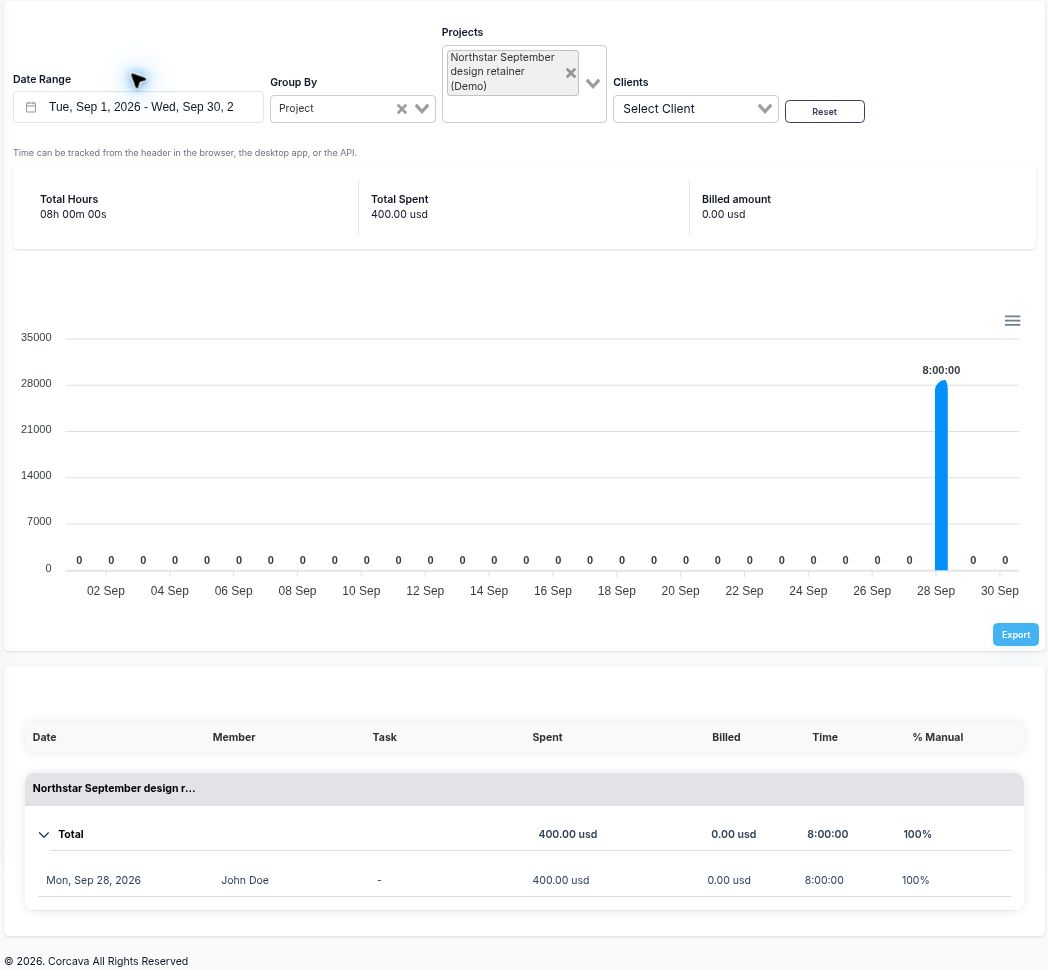
Northstar Studio (Demo) is fictional. Its saved project records a $1,500 monthly fee and a 12-hour allowance. Eight hours of work were entered at a $50/hour cost rate. The separate monthly invoice is Draft with $0 paid.
| Review field | Example | Basis |
|---|---|---|
| Period fee | $1,500 USD | Written scope and manual invoice line |
| Included allowance | 12 hours | Written project description |
| Recorded work | 8 hours | September Time Report |
| Allowance used | 66.7% | Manual: 8 ÷ 12 × 100 |
| Unused allowance | 4 hours | Manual: 12 − 8 |
| Labor cost | $400 | Report Spent; 8 × $50 |
| Modeled contribution | $1,100 / 73.3% | Manual: fee less recorded labor, divided by fee for margin |
| Invoice / paid | $1,500 Draft / $0 paid | Saved invoice, not cash received |
The contribution calculation excludes overhead, tax and other unrecorded costs. It is a fee-based planning calculation, not accounting or cash profit. Four unused hours are an allowance balance; check unfinished commitments before treating them as room for new work.
How to use the worksheet
- Write the covered period, fee, scope and allowance from the agreement. Record any rollover or expiry rules explicitly.
- Filter the time report to the same project and full period. Review missing entries and copy the verified totals.
- Calculate unused hours and contribution using a consistent cost basis. List remaining commitments separately.
- Review the monthly-fee invoice against the agreement. Reconcile included time before any later time-based invoice.
- Assign the next review date and owner. Update the worksheet when records or commitments change.
Copy these fields into your own working document
Client · Period · Owner · Fee and currency · Included scope · Exclusions · Hour allowance · Unused-hour policy · Recorded hours · Remaining commitments · Approved extras · Cost basis · Labor cost · Other recorded costs · Manual allowance balance · Manual contribution · Invoice reference/status/total/paid · Reconciliation note · Next review and decisions.
What the worksheet does not automate
The worksheet does not deduct allowance, transfer rollover, authorize overages or send reminders. A manual fee invoice also does not automatically consume the related time entries. Record your reconciliation so the same included work is not invoiced again.
Corcava's current recurring generation path builds time and expense line items; it does not repeat the configured fixed monthly fee. It can queue email when the client has an email address. Review the current behavior before activating it.
Follow the design-retainer walkthrough for all five real screenshots. You can also compare hourly, fixed-price and retainer workflows or use the retainer profitability calculator for a manual scenario.