
Sprint Review Template
Updated
Use a completed example to prepare your next review: show what is done, collect stakeholder feedback, and agree on what changes next. Download the example, a blank review worksheet, and a separate retrospective worksheet in one free PDF.
3 pages · No email required
See a finished review before writing yours
- Completed example: goal, finished work, feedback, and follow-up decisions.
- Blank review worksheet: print it and fill in your own sprint.
- Optional retrospective worksheet: keep team-process improvements separate.
Free to use and share. Printable PDF; no interactive form fields.
What You'll Get
- Sprint summary section — Sprint number, goal, dates, and overall status
- Completed work table — Items finished, status, and demo readiness
- Demo notes — What was shown to stakeholders and their feedback
- Separate retrospective worksheet — What went well, what didn't, and action items
- Delivery snapshot — Planned and delivered estimates, with actual time kept separate
Completed Sprint Review Example
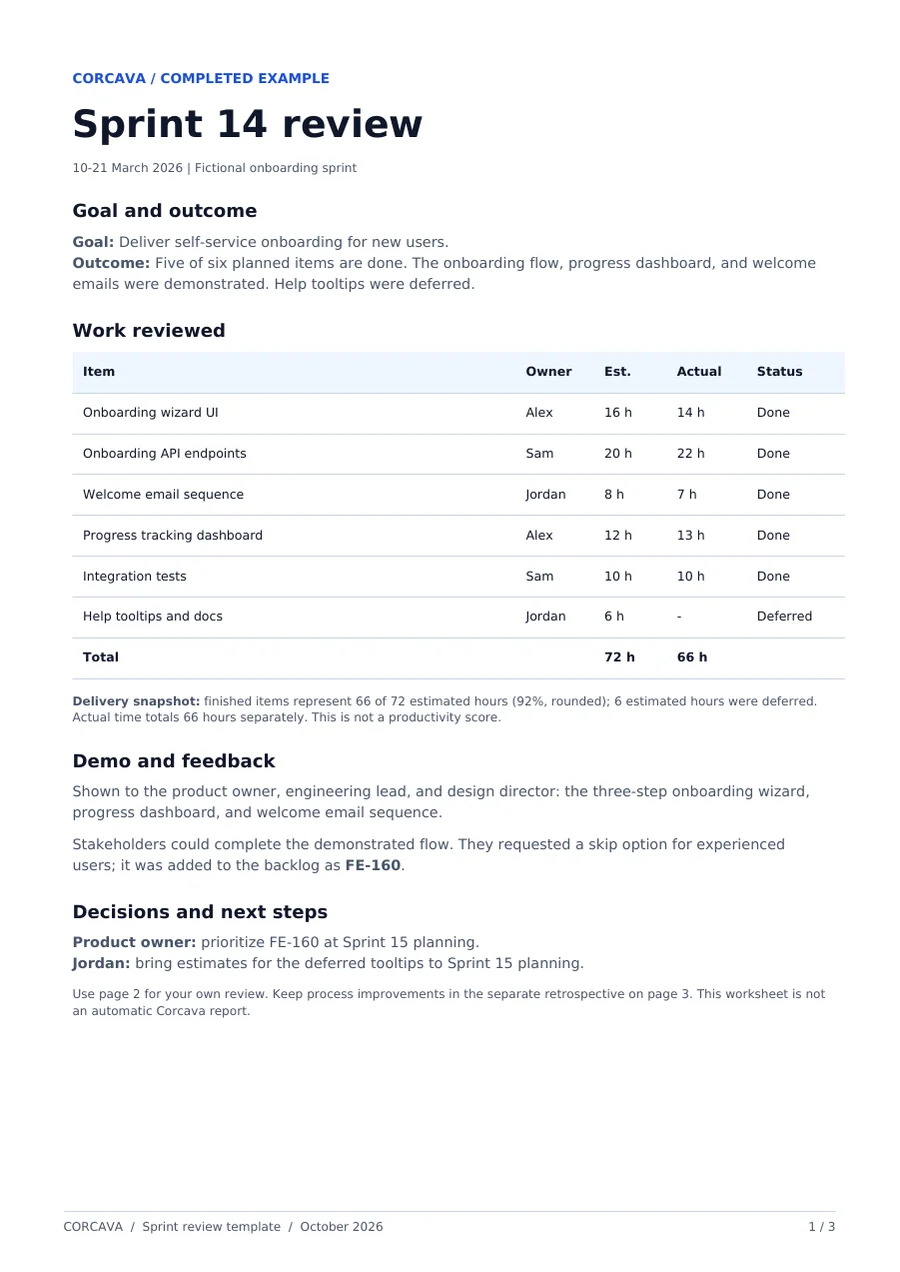
Fictional example for a two-week onboarding sprint. The work table and review decisions match page 1 of the PDF; the separate retrospective notes below illustrate how to use page 3.
| Item | Assignee | Estimate | Actual | Status |
|---|---|---|---|---|
| Onboarding wizard UI | Alex | 16 hrs | 14 hrs | Done |
| Onboarding API endpoints | Sam | 20 hrs | 22 hrs | Done |
| Welcome email sequence | Jordan | 8 hrs | 7 hrs | Done |
| Progress tracking dashboard | Alex | 12 hrs | 13 hrs | Done |
| Integration tests | Sam | 10 hrs | 10 hrs | Done |
| Help tooltips and docs | Jordan | 6 hrs | — | Deferred |
| Total | 72 hrs | 66 hrs | ||
What Went Well
- • API and frontend integration went smoothly due to contract-first approach
- • Welcome email sequence delivered ahead of schedule
- • Daily standups kept blockers visible
What Didn't Go Well
- • Help tooltips deprioritized mid-sprint — should have been flagged earlier
- • Deployment to staging delayed by environment issues (2 hours lost)
Action Items
| Action | Owner | Due |
|---|---|---|
| Add deployment checklist to sprint prep | Sam | Sprint 15 Day 1 |
| Create tooltip backlog items with estimates | Jordan | Sprint 15 Planning |
| Set up staging environment monitoring | Alex | This week |
Five of six items are done. Their original estimates total 66 of 72 hours (92%, rounded). Logged time also totals 66 hours in this example; it is a separate measure, not the basis of the completion percentage or a productivity score.
What Happens in a Sprint Review?
A sprint review is the meeting at the end of each sprint where the team demonstrates completed work to stakeholders, collects feedback, and documents what shipped. It's the moment where the sprint's output becomes visible to people outside the development team — product owners, clients, and anyone with a stake in the outcome.
The Scrum Guide describes the review as a working session to inspect the outcome and adapt what comes next; it is not a release approval gate. The sprint review is separate from a retrospective. The review focuses on the product — what was built, whether it meets expectations, and what stakeholders think. The retrospective focuses on the process — how the team worked together and what to improve. Both happen at the end of the sprint, but they serve different purposes and often have different attendees.
Sprint Review vs Sprint Retrospective
Sprint Review
Happens at the end of each sprint. Focuses on what was built. Attendees include stakeholders. Allow enough time for discussion; the agenda below is a short example.
- • Demo completed work
- • Collect stakeholder feedback
- • Inspect the outcome and discuss next steps
- • Update product backlog
Sprint Retrospective
Happens after the sprint review. Focuses on how the team worked. Internal team only. Allow enough time for discussion; the agenda below is a short example.
- • What went well
- • What didn't
- • Action items for improvement
- • Process changes
Suggested Sprint Review Agenda (30 Minutes)
Sprint goal recap
Remind everyone what the sprint set out to accomplish.
Demo completed work
Walk through each item. Show working software, not slides.
Stakeholder feedback
Questions, concerns, and requests from stakeholders.
Review what didn't ship
Explain what was deferred and why. Discuss carry-over.
Update backlog
Add new items from feedback, reprioritize if needed.
From the project board to the review
Use your actual task list to prepare the review
In Corcava, keep the work on a project board. Before the review, check what is Done, choose what to demonstrate, and bring unfinished items into the discussion. Record the outcome and stakeholder decisions in your worksheet.
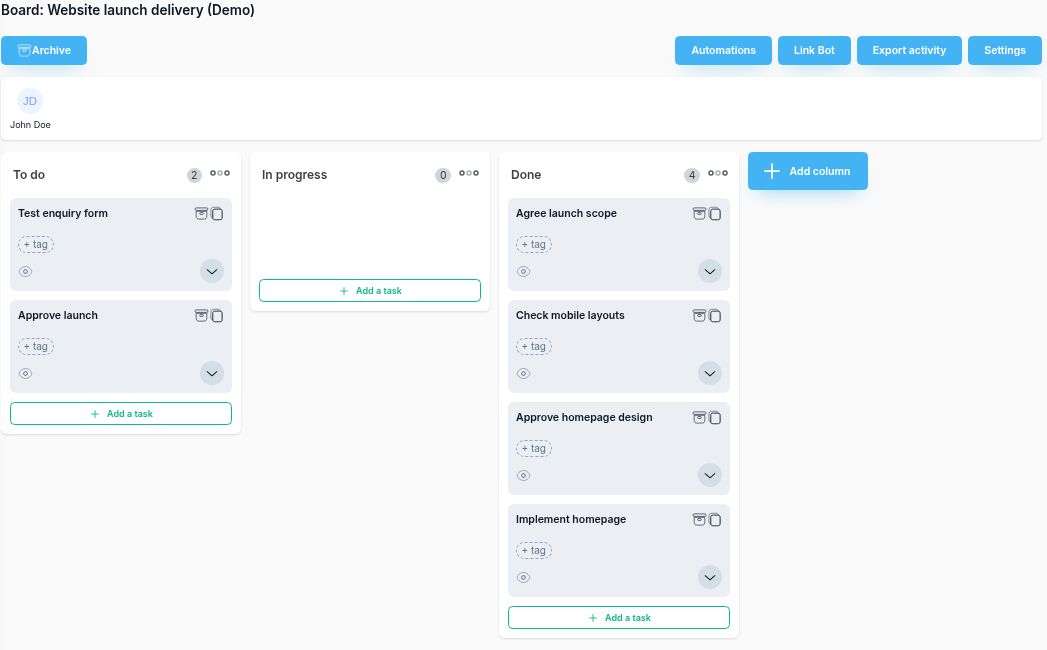
- Prepare: use the task list to identify completed work and items still needing attention.
- Review: demonstrate the outcome, record feedback, and decide how the backlog should change.
- Follow up: create or update tasks for agreed actions, with a clear owner.
The board organizes the work. You write the review notes and decisions; this template does not imply an automatic sprint report or velocity calculation in Corcava.
Predictable delivery builds trust and justifies your rates.See how sprint delivery fits into the full profitability lifecycle →
Frequently Asked Questions
What is a sprint review?
A sprint review is the meeting at the end of each sprint where the team demonstrates completed work to stakeholders, collects feedback, and confirms what was delivered. It closes the loop on the sprint.
How long should a sprint review take?
The 30-minute agenda here is a starting point for a small review. Allow enough time to inspect the outcome and discuss changes. The Scrum Guide sets a maximum of four hours for a one-month Sprint; shorter Sprints usually have shorter reviews.
What is the difference between a sprint review and a sprint retrospective?
The review focuses on the product — what was built, stakeholder feedback, demo. The retrospective focuses on the process — what went well, what didn't, how to improve. Review comes first; retro follows.
Who should attend the sprint review?
The development team, product owner, and relevant stakeholders. For agency work, this often includes the client. Keep the audience small enough for meaningful feedback.
What if not all sprint items are completed?
Show completed work, explain unfinished items, and return them to the backlog for reprioritization. They do not automatically belong in the next Sprint.
Should we track velocity?
Yes, but as a trend, not a target. Velocity helps predict future capacity and improves estimation accuracy. Don't use it to pressure the team into committing more than they can deliver.