
The agency billable-hours playbook
Time tracking and invoicing: turn recorded hours into a client invoice
Updated
An invoice needs more than a total number of hours. It needs the right client, agreed rate, billing period and a traceable explanation of the work. Here is how to prepare those inputs and use Corcava’s Generate line items workflow.
Follow a fictional demo client from recorded work to a saved draft invoice. The screenshots come from Corcava using the example data below; no invoice was sent or paid.
1. Connect the client, project and billing rate
Create the client with the currency you will invoice in. Link the delivery project to that client and enable its Billable setting. The demo project links Website launch (Demo) to Northstar Studio (Demo).
In the project’s Users tab, assign the people doing the work and set their bill rates. A project cost rate and a client bill rate serve different purposes: the bill rate determines the client charge. Each bill rate has an effective start date, which must cover the time you intend to bill.
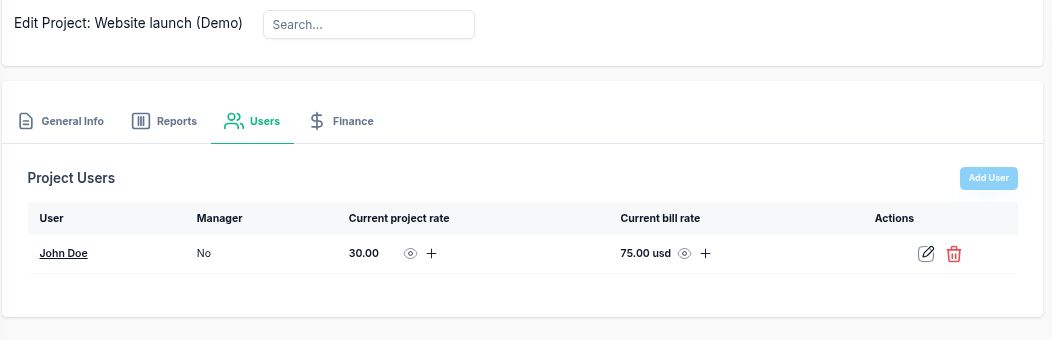
2. Record the work and review the billing period
Use the timer for work as it happens, or My Work → Add Time for a manual entry. Manual entries include the project, date, start and end times, an optional task and a note. Check the workspace timezone when entering work across time zones.
Write notes that identify the deliverable: “Homepage layout, first review” is more useful than “Design”. Stop running timers, correct overlaps or mistakes, and review the relevant dates before preparing the invoice. See how to track billable hours for the underlying recording and classification rules.
Keep internal administration or training in a separate project and select only the client delivery project during invoice generation. Do not assume a note saying “non-billable” will exclude an entry. Whether meetings, research or revisions are chargeable should follow your agreement with the client.
3. Check the hours-to-money calculation
For this demo, we recorded two website-work entries at USD 75 per hour and a separate internal-administration entry. The invoice generator is filtered to September 1–30, 2026 and the website project. There are no expenses, discounts or taxes in this example.
| Work | Time | Decimal hours | Invoice amount |
|---|---|---|---|
| Homepage layout | 3h 30m | 3.50 | USD 262.50 |
| Responsive implementation | 2h 15m | 2.25 | USD 168.75 |
| Internal administration — separate project | 0h 45m | 0.75 | Excluded |
| Client invoice subtotal | 5h 45m | 5.75 | USD 431.25 |
Total recorded work is 6h 30m; chargeable work is 5h 45m. Convert minutes by dividing by 60: 5 + 45 ÷ 60 = 5.75 hours, then 5.75 × 75 = 431.25. Writing 5.45 hours would understate the invoice by USD 22.50.
Use the billable-hours calculator to check decimal hours or an agreed rounding policy. Corcava’s generated invoice lines use recorded durations; the calculator’s optional billing increments are not an automatic invoice-generation setting.
4. Generate the invoice lines from time
- Open Finance → Invoices → Add New and select the client. Client invoices are separate from the invoices a team member submits for their own work.
- Choose Generate line items. Set the date range, client, projects and members. An empty member selection means all members, so check the scope deliberately.
- Start with By user, project, and date. Review the available preview for line count, hours, amount and references to existing invoices. Review any included expenses separately from time.
- Select Generate to fill the invoice lines. Then review descriptions, quantities and unit prices, and add any agreed adjustments. In this demo, we added the work descriptions to the generated lines while keeping their dates, quantities and rates.
- Use Save as draft to keep the invoice for review. Check the final subtotal, discounts and applicable taxes before sending it.
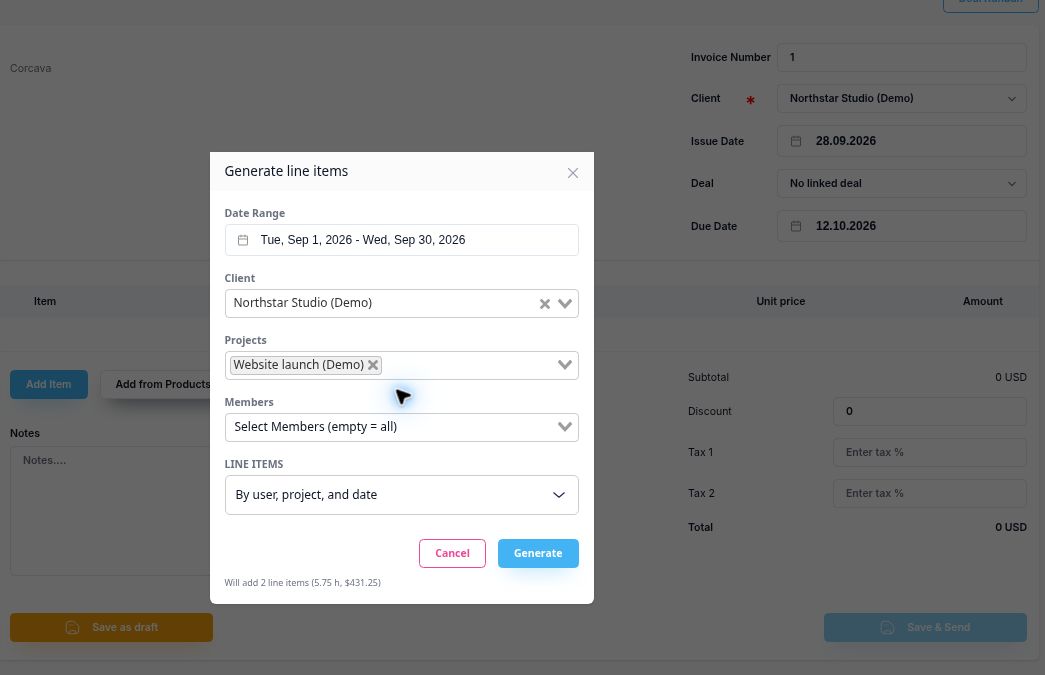
If there is no uninvoiced time, check the date range, project and member filters, whether work has been recorded, and whether the time already belongs to an invoice. Saving a draft already links its generated time entries; those entries are excluded from a later generation even before the invoice is sent or paid.
5. Reconcile before sending
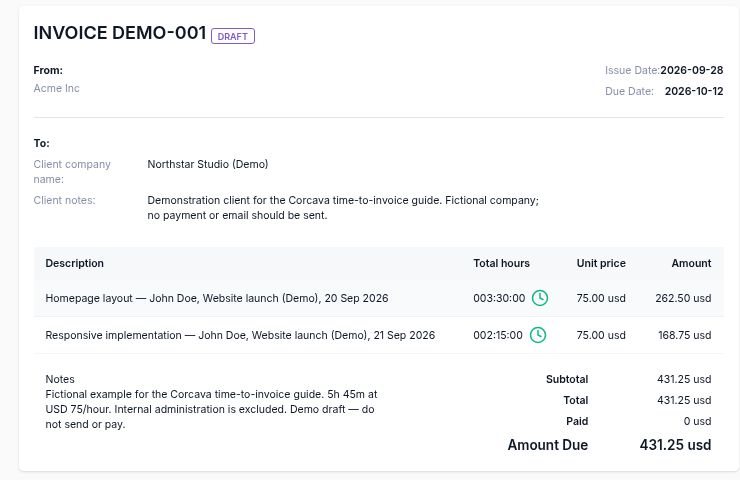
- Scope: only the intended client, people, projects and dates are included.
- Duration: line quantities agree with the time report. On a saved invoice, the clock indicator means the quantity matches linked time-entry duration; it does not approve a rate or confirm payment.
- Price: rates and their effective dates match the agreement. Review subtotals particularly carefully when rates change within a billing period.
- Extras: expenses, manual lines, discounts and taxes explain the difference between time charges and the final total.
- Review: keep a record of what was checked. Drafting and reviewing an invoice should not be described as an automatic timesheet approval or period-locking process.
After billing, handle corrections deliberately and compare the invoice with the time report again. Do not assume invoiced time is immutable. For the wider delivery process, continue with the lead-to-invoice workflow.
Keep time and billing connected
Explore time tracking, invoicing and the billable-work workflow in Corcava.
Start free trialNo credit card required